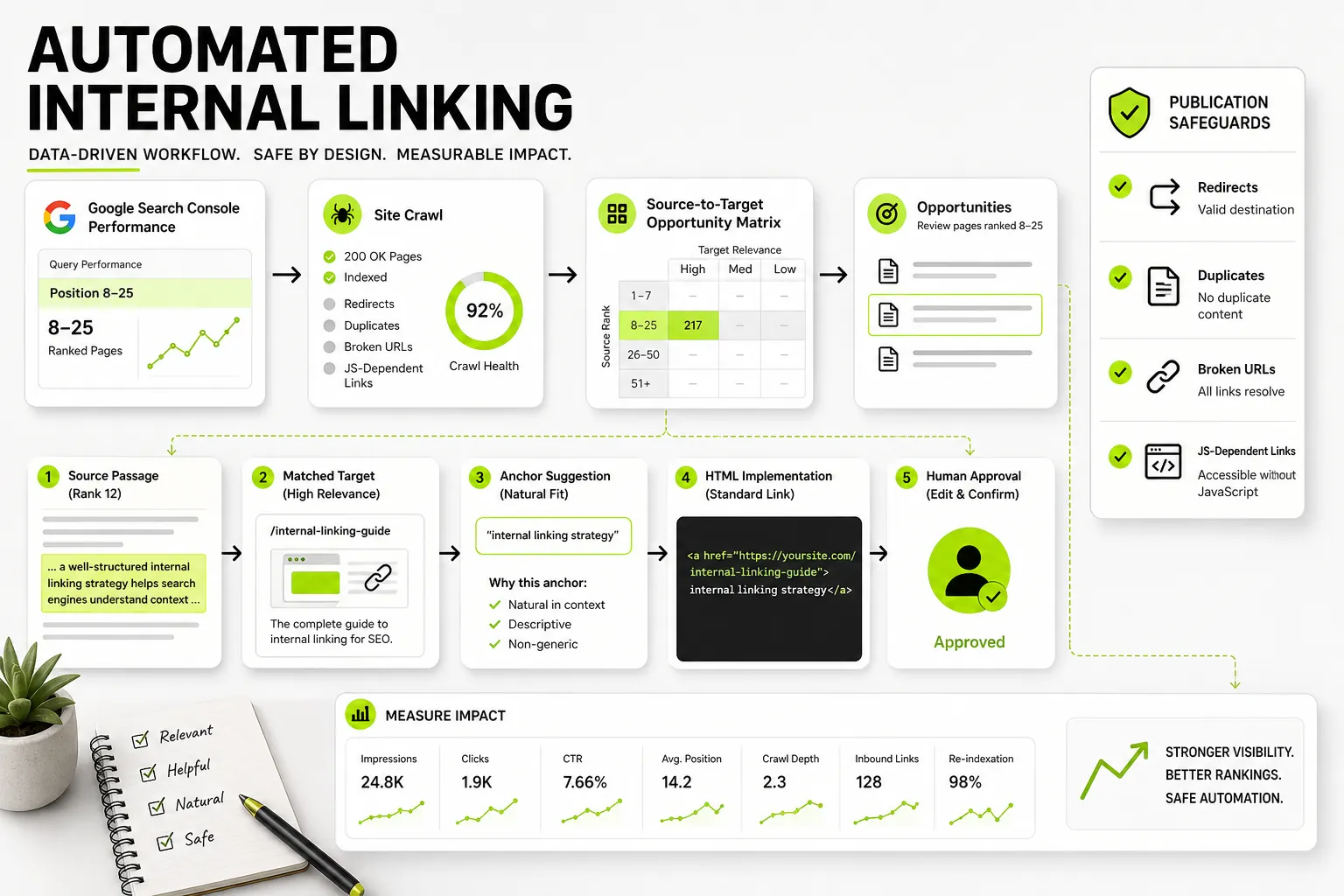
When a website grows past a few hundred pages, maintaining an effective internal linking structure manually becomes almost impossible. Content teams forget older articles exist, SEO spreadsheets quickly fall out of date, and newly published posts sit isolated without contextual links pointing back to them. The result is predictable: striking-distance keywords stagnate on page two of Google, valuable PageRank gets stranded in deep subfolders, and search engine crawlers struggle to discover relevant topic clusters.
Automated internal linking solves this operational bottleneck by algorithmically identifying, validating, and injecting contextual links across large content libraries. However, poorly configured automation introduces severe SEO risks, including over-optimized anchor text, low-relevance links, broken redirects, and client-side JavaScript injection that search crawlers may ignore or penalize.
To automate internal linking safely, publishing teams must implement a structured, data-driven workflow. This guide outlines how to build an auditable automated internal linking process using Google Search Console (GSC) performance data, Natural Language Processing (NLP), server-rendered HTML delivery, and strict editorial governance.
What Is Automated Internal Linking (and Why Manual Methods Fail at Scale)
Manual internal linking relies on memory, site-search operators (like site:domain.com "target keyword"), and static tracking spreadsheets. While this approach works for small sites, it breaks down as publishing velocity accelerates. Editors rarely have the bandwidth to audit hundreds of existing posts every time a new article goes live. Consequently, older posts remain under-linked, while newer pages fail to inherit established authority.
Automated internal linking uses software to scan site content, analyze search performance data, match semantically related passages, and insert hyperlinked anchor text into relevant body paragraphs. When implemented correctly, automation transforms internal linking from a reactive manual chore into a systematic content engineering process.
| Step | Activity |
|---|---|
| 1. Data Ingestion | Google Search Console Performance Data + XML Sitemaps |
| 2. Opportunity Identification | Filter Striking-Distance Targets (Positions 8–25) |
| 3. Semantic Matching | Vector Embeddings & Sentence-Level Similarity Analysis |
| 4. Technical Audit | Filter 301s, 404s, Canonical Clashes, & Target Caps |
| 5. Governance & QA | Human Approval Workflow & Confidence Threshold Scoring |
| 6. Deployment | Pre-rendered or server-side static HTML links |
What Internal Linking Automation Actually Does
True internal-link automation executes four core functions across a digital asset:
- Continuous Content Analysis: It crawls the sitemap and parses body text, identifying candidate sentences where contextual links can be placed naturally.
- Performance-Driven Opportunity Scoring: It pairs under-linked target URLs showing real search demand with high-authority source pages that hold contextual relevance.
- Anchor Text Generation: It uses natural language algorithms to select multi-word anchor phrases that match target page semantics without triggering exact-match spam filters.
- Programmatic Insertion and Validation: It injects valid
<a href>tags into source pages, ensuring links resolve cleanly without redirect chains or HTTP errors.
How Automation Differs from Site Crawlers and Basic WordPress Plugins
It is essential to distinguish modern automated internal linking systems from standard SEO crawlers and legacy CMS plugins:
- Site Crawlers (e.g., Screaming Frog, Lumar): These tools report existing link counts, crawl depth, and broken links after the fact. They identify problems, but they do not programmatically select source sentences or publish links.
- Basic WordPress Plugins: Early link-building plugins rely on simple string matching. If you tell the plugin to link the phrase “SEO audit” to your audit page, it brute-forces that link onto every occurrence across the site. This causes aggressive over-optimization, ignores context, and often inserts links inside headers, buttons, or footers.
- Modern Automated Workflows: Intelligent automation combines GSC search data with NLP vector embeddings. Instead of matching exact strings, it analyzes the full sentence and paragraph context to ensure every inserted link adds genuine reader and search-engine value.
How to Surface and Prioritize High-Impact Internal Link Opportunities
Not all internal links yield equal search results. Indiscriminately adding links across random pages creates noise and dilutes internal PageRank. To drive measurable rankings, an automated system must prioritize targets that are poised to move into top search positions.
Using Google Search Console to Find Striking-Distance Pages (Positions 8–25)
The highest-ROI targets for internal links are “striking-distance” pages—URLs that rank between positions 8 and 25 for valuable search queries. These pages have already proven relevancy to Google, but lack sufficient internal authority or page-level context to rank on page one.
By connecting GSC API data, an automated pipeline can aggregate 90 days of performance data and filter target pages using specific criteria:
- Average Position: Between 8.0 and 25.0 for primary or secondary queries.
- Impression Volume: Minimum threshold (e.g., >500 monthly impressions) to ensure the query carries active search demand.
- Inbound Link Deficit: Pages with fewer than 5–10 internal links relative to their depth in the site architecture.
To establish baseline performance metrics before deploying automated links, conduct a thorough Google Search Console SEO audit . This identifies baseline impressions, ranking distributions, and indexation status so you can track performance gains accurately.
Evaluating Source and Target Page Value Beyond Raw Crawl Depth
A page’s raw depth in a crawl tree does not guarantee its quality as a link source. Automated prioritization models evaluate source and target relationships across four key dimensions:
| Page type | Selection criteria |
|---|---|
| Source page | High GSC impressions and established organic traffic; existing inbound external backlink authority; strong semantic proximity to the target topic; low existing outbound link density (fewer than 10 body links) |
| Target page | Striking-distance queries (positions 8–25); validated canonical URL status (200 OK); high commercial or conversion value; high impression-to-click ratio potential |
By scoring source and target pairs against these parameters, automated tools prevent low-value utility pages (e.g., privacy policies, author archives) from acting as link sources or targets.
Semantic Matching and Contextual Anchor Text Selection
The biggest failure of early link tools was rigid keyword matching. Modern search engines evaluate link context using transformer-based language models. Automated internal linking workflows must adopt these same natural language techniques.
How NLP and Vector Embeddings Connect Relevant Content
Rather than scanning for identical words, advanced automation systems convert page content into vector embeddings—dense numerical representations of semantic meaning.
When analyzing a source page, the system splits content into individual sentences or paragraphs, generates embeddings for each block, and calculates the cosine similarity against the target page’s primary keyword universe.
      Source Sentence: "Companies operating online stores must optimize product schema to display price drops in search."
Target Page Topic: "E-commerce Structured Data Optimization"
Cosine Similarity Score: 0.88 (High Semantic Match -> Candidate for Link Placement)
By leveraging semantic keyword grouping , automation tools map search intent and topical context across target clusters before assigning anchor text, ensuring every link connects tightly aligned content.
Balancing Keyword-Rich Anchors with Over-Optimization Safeguards
Google’s SpamBrain and search algorithms detect artificial link patterns, including repetitive exact-match anchor text across multiple pages. Automated workflows require strict anchor-text variation rules:
- Exact-Match Anchors (15–20%): Uses the primary target keyword directly (e.g.,
automated internal linking). - Partial-Match & LSI Anchors (50–60%): Blends the primary keyword into natural phrases (e.g.,
automating internal link structures,internal link automation software). - Broad / Sentence-Integrated Anchors (20–30%): Uses descriptive secondary phrasing (e.g.,
guide to optimizing site architecture,managing internal PageRank flow).
| Anchor Category | Target Share | Example Anchor Text |
|---|---|---|
| Exact Match | 15%–20% | “automated internal linking” |
| Partial Match | 50%–60% | “internal link automation workflows” |
| Descriptive Broad | 20%–30% | “optimizing site architecture for SEO” |
The system must also enforce a strict uniqueness constraint: never use the exact same anchor text for two different target URLs, and avoid placing multiple links to the same destination page from a single source article.
Architectural Impact: Topic Clusters, PageRank Flow, and Orphan Prevention
Automated internal linking is not just a page-level optimization tactic; it is an architectural framework that structures how authority flows throughout your entire domain.
Strengthening Hub-and-Spoke Structures Across Large Content Libraries
In a standard hub-and-spoke model (or topic cluster):
- Pillar Page (Hub): Covers a broad, high-volume topic comprehensively.
- Subtopic Pages (Spokes): Explore specific, detailed subtopics in depth.
Automated tools maintain topical integrity by enforcing bidirectional linking rules within cluster boundaries:
- Pillar Page (Hub): “Enterprise Content Strategy”
- Spoke Page A (Subtopic): “B2B Editorial Calendars”
- Spoke Page B (Subtopic): “SEO Content Governance”
Both spoke pages link to the pillar page, and the two related spoke pages cross-link to each other.
Automated rules ensure that every spoke page links back to its parent hub using clear, descriptive anchor text, while spoke pages within the same cluster cross-link to adjacent subtopics.
For enterprise sites managing thousands of programmatic pages, applying structured internal linking rules is critical. See our operational playbook on programmatic SEO for SaaS to learn how scalable site structures prevent crawl bloat and maintain internal authority across dynamic architectures.
Eliminating Underlinked Pages Without Breaking Crawl Budgets
Orphan pages (pages with zero inbound internal links) and underlinked pages (fewer than two inbound links) represent lost search traffic potential. Search crawlers may discover orphan pages via XML sitemaps, but assign them low priority because no internal PageRank flows to them.
An automated internal linking system continually monitors sitemap outputs against crawl logs and database tables. When a new or underlinked page is detected, the system immediately surfaces candidate source pages that possess existing authority and relevant context, placing corrective links without requiring manual editorial intervention.
Technical Validation: Link Health, Injection Methods, and Indexability
A technically flawed link is worse than no link at all. Automated tools must execute rigorous pre-publication checks to protect indexability and crawl efficiency.
Why Server-Rendered HTML Links Outperform JavaScript Injection
Some software providers deploy internal links dynamically using client-side JavaScript (JS) tags. While JS injection is easier to install, it introduces significant SEO risks:
- Deferred Rendering: Googlebot processes client-side JavaScript in a two-wave rendering pipeline. If rendering resources are delayed, links may not be crawled or indexed promptly.
- Crawler Incompatibility: Many search engine crawlers (such as Bing, DuckDuckGo, and specialized AI crawlers) have limited or non-existent JavaScript rendering capabilities.
- Fragility: Client-side script errors, ad-blockers, or CDN caching issues can suppress JavaScript links entirely, rendering them invisible to search engines.
To ensure immediate crawlability and 100% indexation, automated systems must deliver pre-rendered or server-side HTML links directly inside standard <a href="..."> tags within the core DOM.
Preferred: Standard server-rendered link
To improve crawl efficiency, implement an automated internal linking workflow within your CMS.
Risky: Client-side JavaScript injection
A dynamic link container populated by an external JavaScript file can fail to render reliably for crawlers.
Pre-Publishing Audit: Eliminating 301 Redirects, 404s, and Duplicate Links
Before any automated link is written to the database or CMS, it must pass an automated technical validation suite:
- HTTP Status Check: Target URLs must return an explicit
200 OKheader. The system must reject URLs returning301,302,404, or5xxstatus codes. - Canonical Tag Alignment: The target URL must match its self-referential canonical tag. If Page A canonicalizes to Page B, the automated system must point the link directly to Page B.
- Self-Link Prevention: The system must verify that a source page never attempts to link to its own URL.
- Duplicate Anchor Check: If a source page already links to a target URL elsewhere in its body, the tool must suppress duplicate link insertions to maintain clean user experience and preserve link equity.
The Step-by-Step Automated Internal Linking Workflow
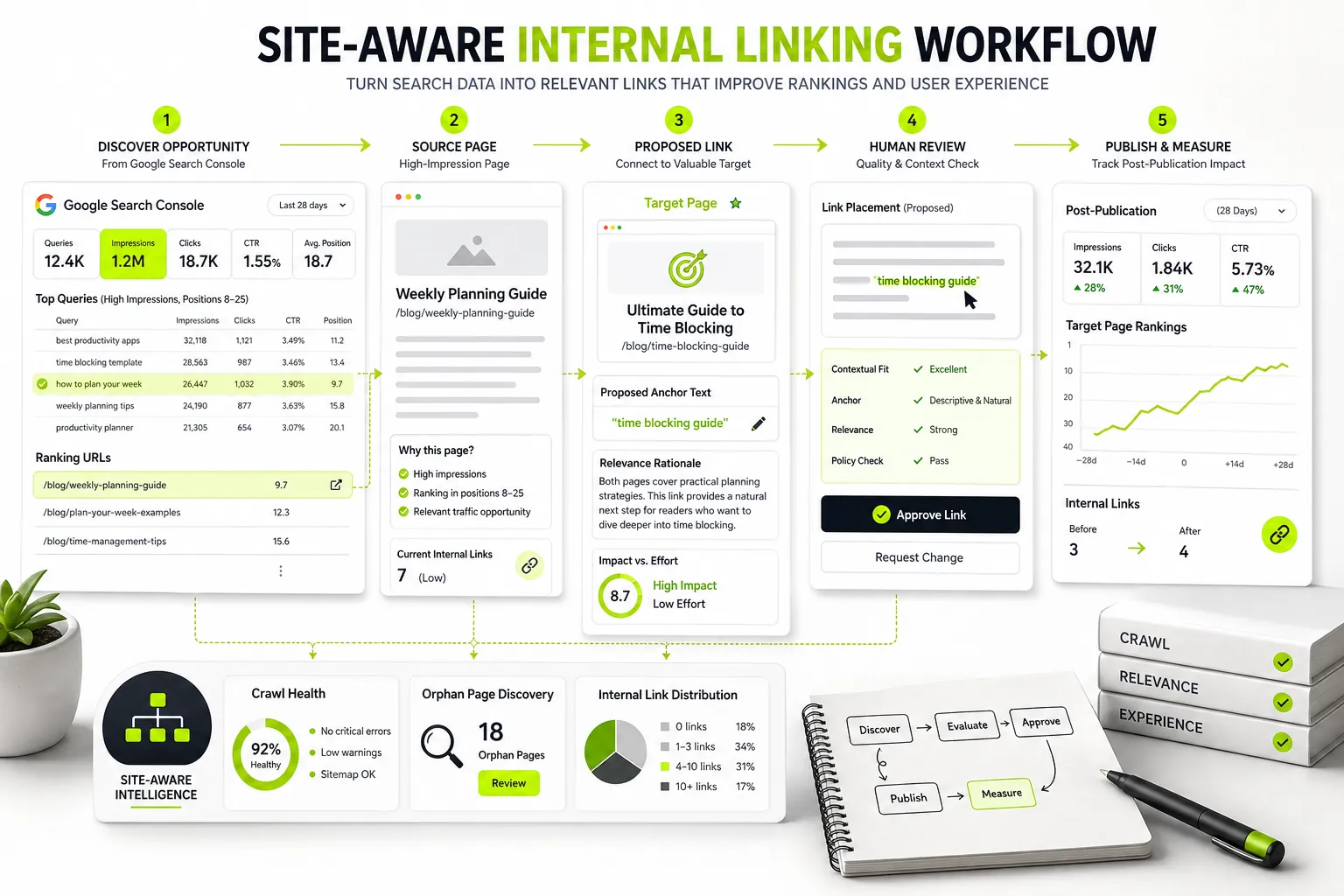
Building an auditable, enterprise-grade internal linking pipeline involves four distinct execution phases.
| Step | Actions |
|---|---|
| Step 1: Ingest & Audit | Sync the GSC API for impressions, CTR, and average positions 8–25; ingest XML sitemaps and parse the existing inbound and outbound link graph. |
| Step 2: Extract & Match | Split source content into paragraph-level vector embeddings; run semantic cosine similarity against target keywords and search intent. |
| Step 3: Technical QA & Editorial Review | Validate target headers for 200 OK status, no 301 or 404 responses, and self-canonical matches; apply confidence thresholds above 0.80 and human approval rules. |
| Step 4: Publish & Monitor | Inject static server-rendered links through the CMS API or webhook; track post-publication GSC impression velocity and crawler re-indexation. |
Step 1: Ingest GSC Performance Data and Sitemap Crawls
The workflow begins by pulling performance data from the Google Search Console API and combining it with a full XML sitemap crawl:
- Query data is extracted at the page level, identifying queries ranking in positions 8–25.
- The system builds an internal site graph mapping existing source-to-target links, canonical structures, and URL path depths.
- Target pages are ranked by impression opportunity and current link deficit.
To manage and structure these inputs before running automated operations, maintain a centralized keyword mapping template . This ensures that target pages, target queries, canonical statuses, and target link thresholds remain fully auditable across teams.
Step 2: Extract Relevant Source Passages and Candidate Anchors
Once priority targets are locked, the system scans eligible source articles across the published library:
- Content is broken down into paragraph-level text blocks.
- Natural Language Processing models analyze sentence syntax to identify noun phrases and topical concepts.
- Candidate anchor phrases are matched against target page keywords using an advanced keyword clustering tool logic to prevent intent mismatches and ensure relevance.
Step 3: Run Technical QA and Editorial Approval
Before publishing, recommendations pass through automated safety gates:
- Confidence Score Threshold: Sentences scoring below a specific semantic threshold (e.g., < 0.80 similarity) are rejected.
- Constraint Validation: The system checks link limits per article, anchor variation quotas, and blocklisted terms.
- Editorial Review Queue: High-confidence links are flagged for one-click human approval or automatically staged depending on the organization’s governance rules.
Step 4: Publish, Index, and Monitor Ranking Impact
Approved links are pushed directly into the content payload via API or native CMS integration:
- The system publishes standard
<a href>code into the HTML body. - Webhooks trigger sitemap updates or ping Search Console’s URL Inspection API to request crawling for modified source pages.
- The system logs publication timestamps to measure impression velocity and keyword position shifts over subsequent weeks.
Human Governance and Safety Controls for Automated Linking
Pure, unmonitored automation can create quality control issues. Maintaining a “human-in-the-loop” governance model ensures site quality while maximizing operational efficiency.
Setting Confidence Thresholds, Blocklists, and Maximum Links Per Page
To maintain editorial integrity, set clear programmatic boundary parameters within your automation platform:
- Maximum Injected Links Per Article: Cap automated insertions at 2–4 links per 1,000 words to avoid content clutter.
- Global Term Blocklists: Exclude sensitive brand terms, legal disclaimers, medical calls-to-action, or transactional phrases from being converted into automated anchors.
- Excluded Source Sections: Restrict automation from injecting links inside lead introductory paragraphs, header tags (
<h1>-<h3>), bulleted summary boxes, or author bios.
Rollback Procedures and Quality Assurance Checklists
Every automated link insertion should be logged in an auditable transaction database, recording the precise timestamp, source URL, target URL, anchor text, and original raw text. If an automated batch produces unexpected anchor distributions or formatting errors, the engineering team must be able to execute a single-click API rollback to revert affected source articles to their exact pre-execution state.
- Target URL returns an explicit HTTP 200 OK status code.
- Target URL matches its self-referential canonical tag.
- Anchor text avoids exact-match overuse across the target link profile.
- Source page contains fewer than the maximum allowed body links (fewer than 4 per 1,000 words).
- Link is delivered as a server-rendered static HTML link.
- Source sentence semantic similarity score meets the minimum threshold (at least 0.80).
- Anchor phrase is excluded from the global legal or brand term blocklist.
Worked Example: Before-and-After Opportunity Matrix and Clean HTML
To understand how automated internal linking operates in practice, consider a realistic source-and-target evaluation scenario.
Source-Target Opportunity Scoring Breakdown
In this scenario, an automated platform processes a target landing page focused on e-commerce technical SEO and evaluates candidate source articles across the domain:
| Parameter | Source Page | Target Page |
|---|---|---|
| URL Path | /blog/ecommerce-conversion-rate | /blog/ecommerce-schema-markup |
| GSC Performance | Position 3.2 for “ecommerce CRO” (High Traffic) | Position 14.1 for “ecommerce schema markup” (Striking Distance) |
| Inbound Link Count | 24 Existing Inbound Links | 2 Existing Inbound Links (Link Deficit) |
| Semantic Similarity | 0.86 Cosine Score (Strong Alignment) | Target Topic Destination |
| QA Status | Passed Blocklist & Threshold Rules | Valid 200 OK, Self-Canonical |
Sentence-Level Anchor Placement and Generated HTML Output
Original Raw Source Text (Pre-Automation):
"“Optimizing your checkout funnel requires testing button placement, streamlining guest accounts, and adding structured metadata to product listings so search engines display rich snippets.”
Automated Recommendation Engine Analysis:
- Candidate Anchor Phrase:
adding structured metadata to product listings - Target URL:
https://example.com/blog/ecommerce-schema-markup - Semantic Relevance: High
- Anchor Type: Partial-Match / Descriptive
Published Output (Clean Server-Rendered HTML):
<p>Optimizing your checkout funnel requires testing button placement, streamlining guest accounts, and <a href="https://example.com/blog/ecommerce-schema-markup">adding structured metadata to product listings</a> so search engines display rich snippets.</p>
Comparing Automated Internal Linking Tools: Features, Pricing, and Methods
Selecting the right internal linking platform depends on your site architecture, publishing volume, technical infrastructure, and CMS setup.
Specialized Platforms vs. CMS Plugins
| Tool / Platform | Primary Delivery Method | Best Use Case | Primary Data Inputs | Governance & Review Controls | Pricing Framework |
|---|---|---|---|---|---|
| Dango | Integrated Content & API Pipeline | Pre-publication brief & draft linking + post-publish automation | Google Search Console API + Site Graph + LLM Embeddings | Pre-publication brief planning + explicit batch review queues | Starter (99 USD/mo), Professional (299/mo) |
| ClarityAutomate | Cloud API / Edge Injection | Enterprise scale & automated page modifications | Google Search Console + Crawl Log Analytics | Granular rule engine & automated regression testing | Custom Enterprise Pricing |
| Surfer (Insert Internal Links) | Web App / Integration | Content editor optimization & post-writing link passes | Surfer SERP Analysis + GSC Data | One-click editor acceptance / manual review | Included in Surfer paid plans |
| Moonlit | Modular Workflow Automation | Custom AI SEO pipelines & programmatic workflows | Custom API inputs + LLM models | Flow-level custom logic & review nodes | Usage-based credit plans |
| Similar AI | SaaS Platform | Large-scale eCommerce & B2B site optimization | Search Console + Search Intent & Taxonomy Models | Automated grouping rules & taxonomy governance | Custom Enterprise Pricing |
| Botify (SmartLink) | Enterprise JS / Edge Engine | Large enterprise domains with dynamic architectures | Botify Log Analyzer + Botify Crawlers | High-level architectural rules & automated routing | Enterprise Contracts |
| Twylu | SaaS Opportunity Finder | Internal link audits & opportunity discovery | Google Search Console API | Manual export & team task assignment | Paid Tier Plans |
| Pagup (WordPress) | WordPress Plugin | Simple SMB WordPress site link automation | On-site WordPress database scanning | Basic keyword-to-URL matching rules | Flat Plugin License |
Selection Criteria: Data Sources, Rendering Methods, and Scale Limits
When evaluating internal linking software, evaluate vendor capabilities against three core criteria:
- Direct Search Console Integration vs. Static Keyword Lists: Tools that integrate natively with GSC identify impression opportunities dynamically. Tools that require manual keyword-to-URL mapping files create ongoing administrative maintenance overhead.
- Server-Rendered HTML vs. Dynamic JavaScript: Confirm whether the solution updates your core CMS database/HTML payload directly or relies on dynamic client-side DOM manipulation. HTML updates are vastly superior for search crawling stability.
- Scale Limits and Governance: Ensure the platform provides confidence threshold scoring, anchor-text distribution controls, blocklists, and full rollback capabilities before approving automatic changes across thousands of pages.
Dango’s GSC-First Workflow: Planning Contextual Internal Links Before Publication
Many internal linking tools operate entirely reactively—waiting until after content is published to scramble for link placement. Dango takes a fundamentally different, GSC-first approach by embedding internal link architecture directly into the content creation process.
Integrating GSC Data, Keyword Clusters, and Content Briefs into One Pipeline
Dango operates as an end-to-end AI SEO platform rather than a standalone link-injection script. By connecting directly to your Google Search Console performance data and XML sitemaps, Dango maps your existing search landscape before a single word of new content is written.
| Step | Outcome |
|---|---|
| 1. Sync GSC & Sitemap | Maps ranking queries, striking distance, and link density. |
| 2. Cluster Keywords | Groups semantic search intent into topic clusters. |
| 3. Build Content Brief | Pre-determines internal source-target relationships. |
| 4. Draft & Inject | Places exact contextual HTML links during writing. |
| 5. Direct CMS Publish | Pushes pre-linked, optimized articles to WordPress. |
When Dango builds content briefs and generates AI articles, it evaluates candidate target pages across your domain that are currently sitting in striking-distance positions (8–25). It then instructs the generation engine to naturally draft sentences around those exact topics, embedding validated contextual links directly into the initial text.
How Dango Automates Link Planning for New and Existing Content
By integrating search data, keyword clustering, brief generation, and publishing into a single operational workflow, Dango solves internal linking at both ends of the content lifecycle:
- For New Content: Internal links to your priority target pages are planned and inserted natively while the article is drafted. When you publish via Dango’s direct CMS integration, the piece goes live with fully contextual, server-rendered HTML links already in place.
- For Existing Content: Dango analyzes your published content library against live GSC data, surfacing high-relevance source-target pairs and staging exact sentence modifications for simple human approval.
Rather than relying on client-side scripts or post-publication hacks, Dango ensures your site architecture remains clean, auditable, and structurally sound from day one.
How to Measure the SEO Impact of Automated Internal Links
To validate the ROI of your automated internal linking strategy, track performance metrics across search engines and site crawlers. Never rely on vanity metrics; measure actual ranking and indexing shifts.
Tracking Impressions, CTR, and Query Expansion in Search Console
When an underlinked target page receives a batch of high-relevance internal links, Search Console typically reflects performance improvements across three distinct stages:
| Stage | Response |
|---|---|
| Stage 1 (Days 1–14) | Impression Growth & Query Expansion: Search engines index new links and test the page for long-tail search queries. |
| Stage 2 (Days 14–45) | Position Consolidation: Striking-distance keywords (positions 8–25) move toward top-page rankings as PageRank equity consolidates. |
| Stage 3 (Days 45+) | Organic CTR & Click Velocity Growth: Higher rankings yield increased organic click volume and stable traffic gains. |
- Query Expansion: Count the total number of unique queries returning impressions for the target page. Internal links pass topical context, causing Google to associate the target page with broader long-tail search variations.
- Impression Velocity: Track 14-day rolling impression totals for striking-distance terms. A sudden upward curve in impressions signals that Google has recognized the increased internal authority.
- Average Position Shifts: Monitor keyword position tracks in GSC, looking for movement from page two (positions 11–20) into page one (positions 1–10).
Monitoring Inbound Link Velocity and Search Crawler Activity
Use site logs or web crawler diagnostics to evaluate structural impact:
- Crawl Frequency: Check server logs to see if Googlebot increases its crawl frequency on target pages after new internal links are published.
- Crawl Depth Reduction: Ensure top-priority target pages move closer to the homepage root in terms of click-distance (targeting a maximum depth of 2–3 clicks).
- Inbound Link Distribution: Verify that inbound links across your site graph show a smooth distribution curve rather than unnatural spikes.
Frequently Asked Questions About Automated Internal Linking
Can automated internal linking harm my site’s SEO if overused?
Yes. Overusing automated internal linking can trigger spam flags or dilute page equity if implemented without strict controls. Common issues include adding excessive links per article, repeatedly using exact-match anchor text, pointing links to redirected or broken pages, or forcing links into semantically unrelated content. To avoid penalties, enforce maximum link limits, vary anchor text distributions, restrict links to high-relevance matches, and maintain human review workflows.
Why are server-rendered HTML internal links safer than JavaScript link injection?
Server-rendered HTML links (<a href="...">) are hardcoded directly into the web page’s source code delivered by the web server. Search engine crawlers process these links instantly during their initial crawl wave. Client-side JavaScript injection renders links after the page loads in the browser, which can cause crawl delays, rendering errors, or complete non-indexing by crawlers that do not execute complex JavaScript.
How many internal links should be added per article when using automation?
As a general rule, add 2 to 4 automated internal links per 1,000 words of body content. Adding too many links clutter paragraphs, distracts readers, and dilutes the amount of PageRank passed to each target URL. Always prioritize link quality and topical context over sheer link volume.
How does semantic internal linking differ from traditional exact-match keyword linking?
Traditional exact-match linking relies on basic string searches, inserting links whenever a specific target keyword phrase appears in the text. Semantic internal linking uses Natural Language Processing (NLP) and vector embeddings to analyze the overall context and meaning of a sentence or paragraph. This allows software to identify natural contextual link placement opportunities even when exact keyword strings are not present.
Can automated internal linking tools handle subdomains or external links?
Most enterprise automation tools can scan and link across subdomains if configured within the project scope and sitemap definitions. However, automated external linking to third-party domains requires strict domain filtering, blocklisting, and rel="nofollow" or rel="sponsored" tag management to avoid passing link equity away from your domain or violating search engine guidelines.
Should human editors review automated internal link suggestions before publishing?
Yes. Implementing a human-in-the-loop review workflow is the safest approach to automated internal linking. While AI models handle the heavy lifting of identifying candidate sentences, matching target URLs, and checking technical status, human editors verify that anchor text reads naturally within sentence flow and maintains editorial brand tone.
How quickly do search engines pick up newly published automated internal links?
Search engine pickup depends on your domain’s existing crawl budget and crawl frequency. For high-authority, frequently crawled websites, Googlebot may detect and index new internal links within 24 to 48 hours. For smaller or less frequently crawled sites, indexation can take anywhere from 1 to 3 weeks unless accelerated by submitting updated XML sitemaps or requesting indexing via Google Search Console.
Scale Your Internal Linking Strategy Safely with Dango
Turn Keyword Insights into Published Contextual Links
Manual internal linking cannot keep pace with modern digital publishing. However, relying on unvalidated plugins or risky client-side script injection exposes your site to over-optimization penalties and crawl errors.
Dango eliminates the friction of internal linking by connecting Google Search Console performance data, semantic keyword clustering, content brief creation, and CMS publishing into one seamless, auditable pipeline. By identifying striking-distance targets and integrating contextual HTML links during content creation, Dango ensures your site architecture grows stronger with every article you publish.
Ready to automate your internal linking strategy safely without sacrificing quality or control? Get started with Dango today—paid plans start at 99 USD/month for Starter and USD 299/month for Professional.