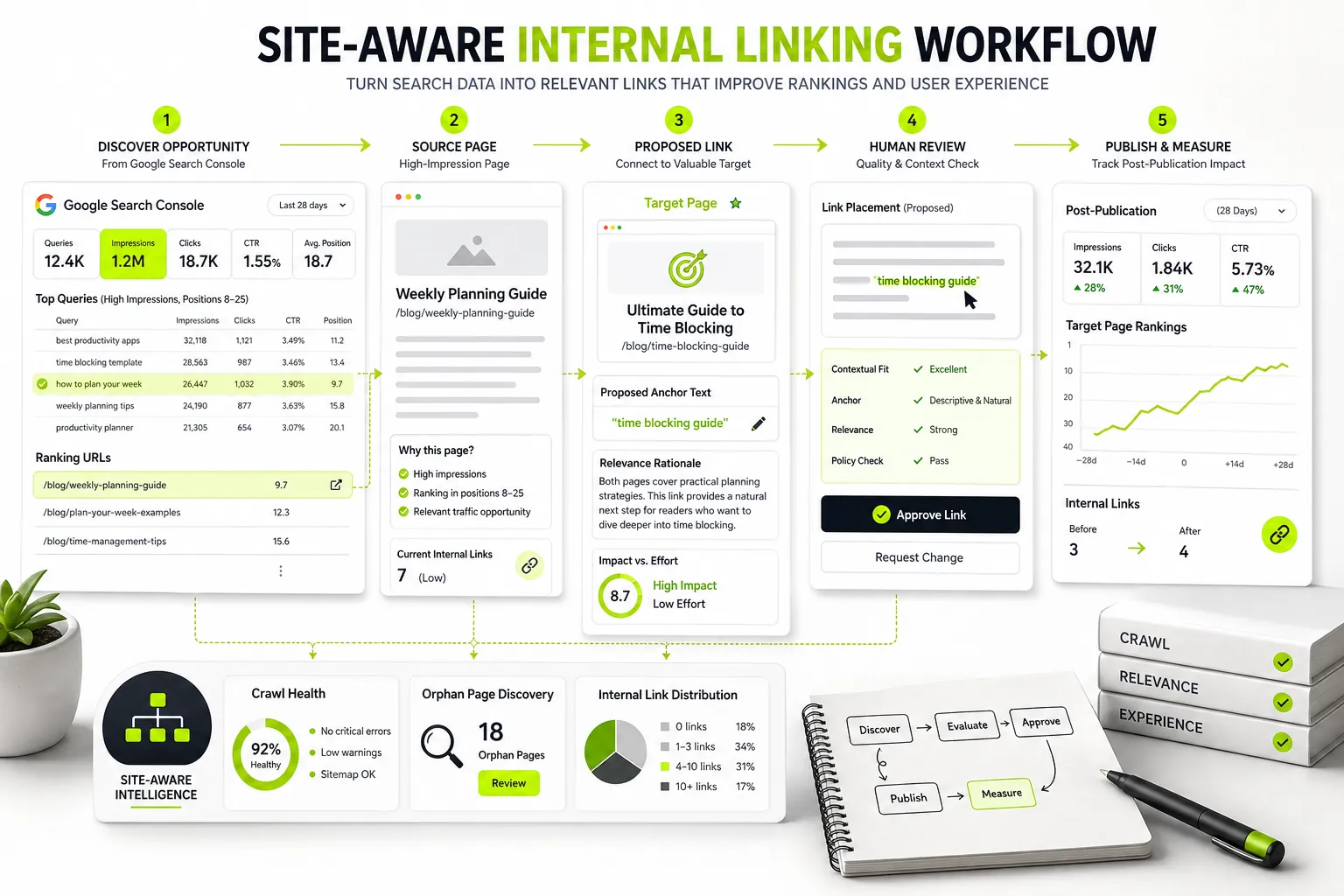
Internal linking remains one of the most reliable organic growth levers available to search engine optimization teams. Unlike external backlink acquisition, internal link architecture is entirely within your control. Reallocating PageRank, clarifying topical hierarchies, and guiding Googlebot through critical conversion paths requires zero outreach, third-party negotiations, or link-building budgets.
However, executing internal linking manually across hundreds or thousands of URLs quickly becomes unsustainable. Marketers often rely on messy spreadsheets, VLOOKUP functions, and guesswork to map source pages to target URLs. This manual approach leads to missing high-priority target pages, creating orphan content, and using repetitive, over-optimized anchor text that risks algorithmic suppression.
A specialized internal linking tool automates the tedious aspects of link architecture management. By scanning site structures, evaluating semantic relevance, and pulling real performance data, these tools streamline discovery, auditing, and implementation.
This guide evaluates the 14 best internal linking solutions available in 2026, details a framework for identifying high-impact link placements, and outlines how to incorporate internal link generation into your overall SEO publishing workflow.
What Is an Internal Linking Tool and How Does It Work?
An internal linking tool is a software application designed to discover, audit, recommend, or automatically deploy internal hyperlinks across a website. By analyzing site architecture, text context, and search engine performance data, these systems ensure PageRank flows efficiently to priority target pages while preventing orphan content and indexation bottlenecks.
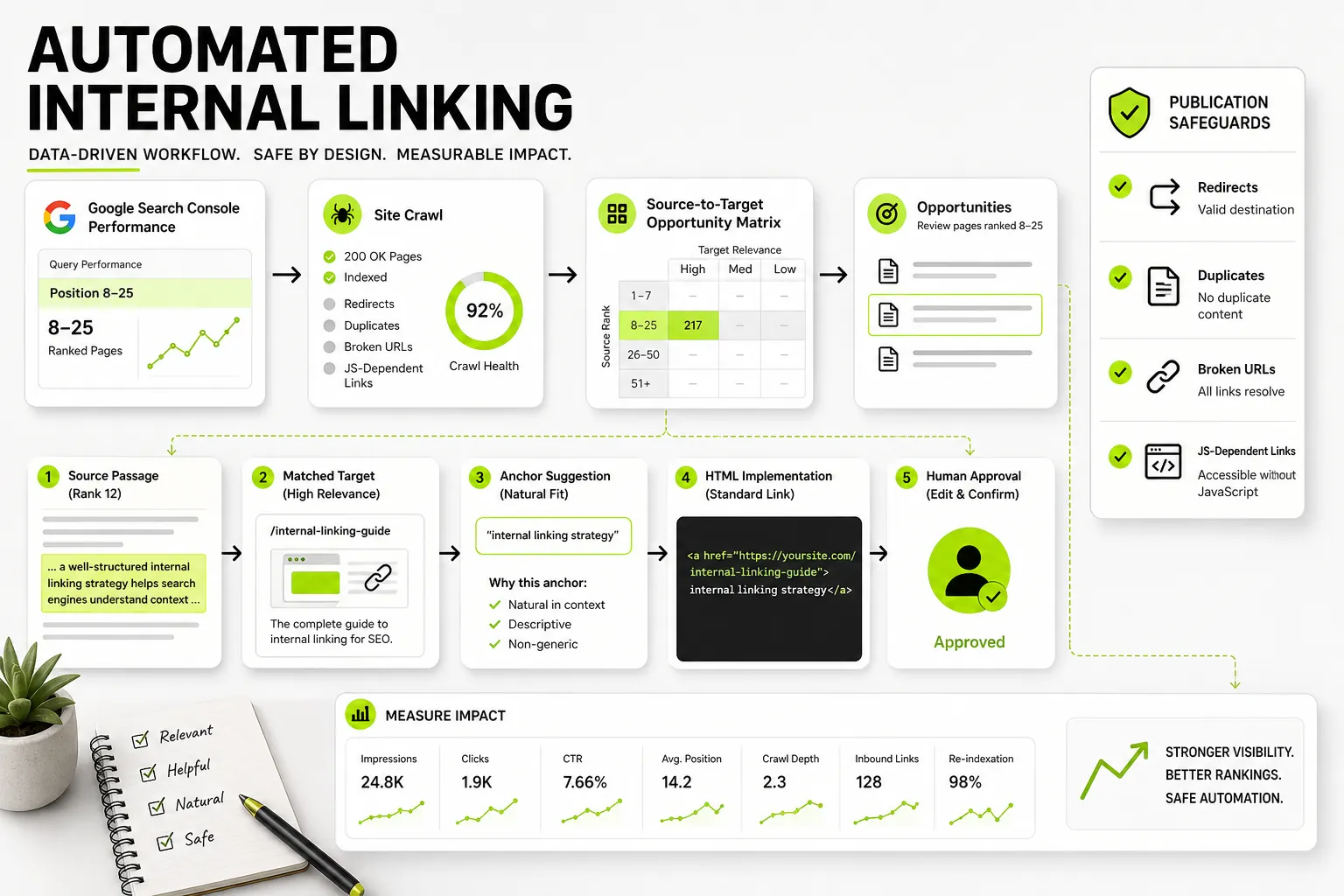
Internal linking tools typically follow this workflow:
- A site crawler or Google Search Console API collects site and performance data.
- A semantic context engine evaluates embeddings, TF-IDF, and keyword overlap.
- A recommendation engine creates an opportunity matrix and selects anchor text.
- Teams either review recommendations manually in the CMS or deploy them through plugins, scripts, or APIs.
Core Capabilities: Discovery, Link Audits, Recommendations, and Implementation
Modern internal linking software operates across four core functional layers:
- Opportunity Discovery: Software analyzes published content assets to identify contextual matches for strategic target pages. Advanced engines evaluate semantic proximity using vector embeddings or term frequency algorithms rather than relying purely on exact keyword matches.
- Link Auditing: Tools crawl site topologies to surface technical link health issues. Audits map internal PageRank flow, calculate click depth from the root directory, identify orphan URLs (pages with zero inbound internal links), and log broken (404) or redirected (301) internal links.
- Recommendation Engines: These systems generate contextual recommendations by identifying exact source sentences, suggesting relevant anchor text, and scoring confidence based on semantic alignment.
- Implementation and Publishing: Execution methodologies vary based on platform design. Tools deliver suggestions via CMS editorial sidebars, export CSV payloads for manual batch updates, or inject links dynamically into page headers or content bodies.
Implementation Models: Manual Spreadsheets, Plugins, Crawlers, and AI SaaS Solutions
Choosing the right tool depends on your team’s technical architecture, publishing velocity, and governance requirements. Software options generally fall into four technical models:
- Manual Spreadsheets and Search Operators: SEOs export site crawls and Search Console data, using
site:domain.com "target keyword"queries alongside VLOOKUP or Python scripts to match source pages with target pages manually. - WordPress Plugins: Native extensions (such as Link Whisper or Yoast SEO) hook into the WordPress MySQL database. They scan content in real time and allow editors to insert internal links directly within the WordPress block or classic editor interface.
- Desktop and Cloud Crawlers: Site crawlers (such as Screaming Frog or Semrush Site Audit) map internal link topologies from the outside in. They analyze inbound and outbound link counts, anchor text distributions, and depth metrics, but require manual editing within the CMS to implement recommendations.
- AI SaaS Platforms: Modern cloud applications process content through serverless pipelines, evaluating semantic context across large page libraries. Platforms like Dango combine crawling, Search Console data, and AI-driven content creation, embedding contextual internal links directly into content briefs and editorial workflows before publication.
Technical Performance Considerations: JavaScript Rendering and Indexability
How an internal link is technical rendered fundamentally dictates whether search crawlers process it correctly.
Internal links delivered as valid, standard hyperlinks can be crawled directly and pass PageRank. Links added dynamically through JavaScript may enter a deferred rendering queue, particularly when they rely on clickable non-link elements rather than standard hyperlinks.
Standard HTML links (<a href="https://example.com/target">) are parsed immediately during Googlebot’s initial crawl pass. However, tools that rely on client-side JavaScript injection—such as dynamic web components or dynamic DOM manipulation—can introduce crawl friction.
When links are injected dynamically via JavaScript after page load, search engine crawlers must push the page to a secondary rendering queue. If the client-side script uses non-standard markup (like onclick events or <span> tags instead of standard <a href> elements), Googlebot may fail to follow the link altogether.
This causes PageRank calculation drops and delays target page indexation. Ensure any automated link delivery method outputs standard, server-side rendered or pre-rendered HTML hyperlinks.
How to Identify and Prioritize Internal Linking Opportunities
Building a high-impact internal link strategy requires prioritizing effort where search engines can respond fastest. Rather than distributing links arbitrarily, focus on identifying specific high-leverage internal linking opportunities across your site.
Leveraging Google Search Console for Striking-Distance Pages (Positions 8-25)
The fastest organic traffic gains come from target pages ranking in “striking distance”—typically ranking between positions 8 and 25 for valuable target queries. These URLs have demonstrated relevance to Google, but lack sufficient PageRank or contextual authority to break into the top five results.
Use this prioritization process:
- Review Google Search Console query data.
- Filter for positions 8–25.
- If a query has high impressions, classify its target URL as a high-priority target page.
- If it does not meet the position or impression criteria, deprioritize it.
To isolate these priority targets using Search Console:
- Filter performance data for the last 90 days.
- Filter positions to display queries with an average position greater than 7.9 and less than 25.1.
- Sort results by total impressions descending. High impression counts coupled with low click-through rates (CTR) signal pages that are ranking on page two or three for high-volume keywords.
Targeting these pages with contextually relevant inbound internal links passes authority directly to URLs that need a marginal push to secure page-one rankings. For a deeper breakdown of diagnosing indexation, positioning, and crawl performance, consult this guide to conducting a Google Search Console SEO audit .
Auditing Site Architecture: Uncovering Orphan Pages, Dead Ends, and Underlinked Content
A structural link audit focuses on finding technical deficiencies in your URL hierarchy. Every published page should serve a distinct purpose and remain discoverable through clean crawl paths.
| Architectural Issue | Technical Definition | Search Engine Impact | Remediation Strategy |
|---|---|---|---|
| Orphan Pages | URLs with 0 internal inbound links within the crawl path. | Indexed via sitemaps only; low crawling frequency and low rank capability. | Insert 2–5 contextual links from topically relevant source pages. |
| Dead Ends | Pages containing 0 outbound links to other site pages. | Crawlers reach a termination point; PageRank flow stops completely. | Add relevant outbound contextual links or “Recommended Reading” blocks. |
| Underlinked Pages | High-value pages with fewer than 3 inbound contextual links. | Starved of PageRank despite targeting competitive terms. | Identify relevant source pages using keyword overlap analysis. |
| Excessive Click Depth | Pages requiring >3 clicks from the homepage to reach. | Low crawl priority and reduced authority pass-through. | Move link source higher up in navigation or top-level topic hubs. |
To systematic prevent structural issues before content creation, establish a structured GSC-first keyword mapping workflow to align every query with a dedicated URL and clear parent-child linking paths.
Anchor Text Strategy: Balancing Relevance, Variation, and Over-Optimization Risks
Anchor text tells search engines what topic the receiving target page covers. However, repetitive use of exact-match keyword anchor text can trigger over-optimization filters.
Use a balanced anchor text distribution:
- Exact match (15–20%): “internal linking tool”
- Partial match (40–50%): “automated internal linking tool for SaaS”
- LSI or semantic variation (30–40%): “optimize contextual link structures”
Maintain a natural anchor text distribution by adhering to three core principles:
- Limit Exact-Match Anchors: Keep exact-match phrases to roughly 15–20% of total inbound internal links for a target page.
- Prioritize Partial-Match and Descriptive Anchors: Use phrase-match anchor text (40–50%) that naturally integrates into surrounding sentence structures (e.g., using “evaluate an automated internal linking tool for SaaS” rather than just “internal linking tool”).
- Incorporate Semantic Variations: Use LSI keywords and natural language synonyms (30–40%) to signal topical breadths without trigger keyword-stuffing patterns.
Avoid using identical anchor text to link to two different target URLs. If Page A and Page B both receive inbound internal links with the anchor text “SEO automation software,” search crawlers struggle to determine which URL is the canonical authority, leading to keyword cannibalization.
Structuring Links across Contextual, Topic Cluster, Hub-and-Spoke, and Programmatic Layouts
Link placement architecture varies based on site content structures:
- Contextual Body Links: Links embedded naturally within body paragraphs pass the highest editorial value. Google assigns higher weight to links surrounded by semantically relevant context.
- Hub-and-Spoke (Topic Clusters): A primary pillar page (hub) targets broad short-tail keywords and links down to supporting spoke articles. Every spoke article links directly back to the pillar page using descriptive variations of the core topic anchor text.
- Navigational and Footer Links: Global navigation links distribute sitewide authority but carry less topical specificity than contextual body links. Use navigational links sparingly for core commercial categories.
- Programmatic Layouts: Large-scale directory sites, marketplaces, or SaaS platforms with template-driven pages require systemized linking logic. Ensure cross-links between programmatic entities rely on rigid database taxonomy rules to avoid generating millions of low-value, repetitive links. Teams managing scaled content structures can reference this playbook on programmatic SEO for SaaS to establish consistent link rules across automated templates.
Evaluating AI Link Suggestions vs. Manual Human Review
AI-driven internal linking tools reduce audit times, but relying on unvetted, fully automated insertion risks damaging site content quality and user experience.
Use the following review workflow:
- Identify a candidate link.
- Evaluate its semantic match with AI.
- Reject the candidate if its confidence score is 85% or lower.
- For scores above 85%, conduct human review:
- Is the sentence fluid?
- Is the context accurate?
- Is the target page correct?
- Approve and publish the link, or reject it.
Assessing Semantic Relevance and Source-Target Confidence Scores
Legacy link building tools relied heavily on basic string-matching algorithms. If Page A contained the exact string “SEO software,” the tool flagged it as a link source for Page B, regardless of context.
Modern AI platforms use vector embeddings to measure semantic distance between source paragraphs and target concepts. Software computes a numeric confidence score (e.g., 0% to 100%) indicating thematic alignment.
When evaluating automated tools, set acceptance thresholds high—typically requiring a confidence score of 85% or greater before presenting link recommendations to editorial teams.
Safeguards Against Over-Linking and Poorly Inserted Context
Uncontrolled automated link insertion often damages reader experience. Common automated insertion mistakes include:
- Grammatical Disruption: Inserting hyperlinks into sentences without adjusting syntax, resulting in awkward phrasing.
- Link Density Saturation: Adding 15 links into a 600-word post creates visual noise and dilutes individual link authority.
- Out-of-Context Additions: Appending shoehorned sentences at the end of paragraphs solely to house an anchor keyword.
Always maintain strict link density caps (such as a maximum of 1 internal link per 250 words) and mandate human review for any tool that modifies body content.
Link Health Checks: Fixing Broken Links, Redirect Chains, and Nofollow Attributes
Before adding new internal links, audit your existing link infrastructure to fix baseline technical issues:
- Broken Links (404s): Internal links pointing to dead pages waste crawl budget and disrupt user navigation. Update or remove them immediately.
- Internal Redirect Chains: Linking to a URL that returns a 301 redirect to a second URL slows down crawl processing and degrades PageRank transfer. Update target links directly to final destination URLs (
200 OK). - Nofollow Attributes: Ensure internal contextual links do not contain
rel="nofollow",rel="sponsored", orrel="ugc"attributes, which explicitly instruct search engines to ignore authority transfer across your own domain.
14 Best Internal Linking Tools Compared for 2026
The market for internal link management software spans lightweight WordPress extensions, enterprise crawlers, specialized SaaS tools, and all-in-one publishing platforms.
Feature Comparison Matrix: Integrations, CMS Support, and Pricing
| Tool Name | Tool Category | Primary CMS Support | Search Console Data? | Automated Insertion? | Starting Price |
|---|---|---|---|---|---|
| Dango | SaaS Platform | Any (GSC/API/Export) | Yes (Native) | Brief & Workflow-Integrated | $99/mo |
| Screaming Frog | Desktop Crawler | CMS Agnostic | Yes (API) | No (Audit Only) | Free / £209/yr |
| Semrush Site Audit | Cloud Suite | CMS Agnostic | Yes (API) | No (Audit Only) | $139.95/mo |
| Link Whisper | WordPress Plugin | WordPress | Yes | Optional | $77/yr |
| Linkilo | WordPress Plugin | WordPress | Yes | Optional | $49/yr |
| Yoast SEO Premium | WordPress Plugin | WordPress / Shopify | No | No (Sidebar Recs) | $99/yr |
| AIOSEO Link Assist | WordPress Plugin | WordPress | No | Yes (One-Click) | $124/yr |
| LinkStorm | Cloud SaaS | Any CMS | No | No (Audit & Recs) | $30/mo |
| SEOJuice | AI SaaS Platform | Any CMS (via JS/API) | No | Yes (Automated) | $29/mo |
| Linkbot | Cloud SaaS | Any CMS | Search Console | Yes (Automated) | €49/mo |
| LinkBoss | AI SaaS / Plugin | WordPress / Webflow | No | Yes (AI Contextual) | $50/mo |
| Twylu | GSC Cloud SaaS | Any CMS | Yes (GSC-Native) | No (Reporting & Recs) | £27/mo |
| Similar AI Agent | Enterprise SaaS | Enterprise Custom | Yes | API / Automated | Enterprise |
| Sitebulb | Desktop / Cloud | CMS Agnostic | Yes (API) | No (Audit Only) | $13.50/mo |
Free Standalone Checkers & Desktop Crawlers: Screaming Frog and Semrush Site Audit
1. Screaming Frog SEO Spider
Screaming Frog remains the standard for technical site crawling. Its internal link algorithms calculate exact inbound and outbound link counts, internal PageRank distributions (Inlink Rank), and click depth across every URL on your domain.
By connecting Google Search Console API credentials, technical teams can isolate underlinked pages alongside performance metrics. While it does not offer automated text insertion, its audit capabilities are unmatched for technical validation.
The Screaming Frog crawl pipeline follows four steps: crawl sitemaps, process inbound links, calculate Inlink Rank, and export an opportunity matrix.
2. Semrush Site Audit
Semrush provides a cloud-based audit module that flags internal link errors across entire domains. It features a dedicated Internal Linking Report that visualizes link distribution, isolates pages with low Internal PageRank, identifies broken internal links, and flags internal redirect chains. It serves as an accessible audit baseline for marketing teams managing broader SEO campaigns.
WordPress Plugins: Link Whisper, Linkilo, Yoast SEO Premium, and AIOSEO Link Assistant
3. Link Whisper
Link Whisper is one of the most widely used WordPress plugins for internal link automation. Operating directly within the post editor, it scans content in real time and uses natural language processing to suggest contextual internal links as you write.
It provides reporting on orphan pages, broken links, and target anchor text distributions, allowing editors to add suggested links with a single click without opening individual post pages.
4. Linkilo
Linkilo is a WordPress plugin designed for editorial teams looking to track anchor text distribution and internal link density. It provides detailed reporting on internal and external link ratios, offers automated anchor-matching suggestions, and alerts editors when specific URLs exceed target link thresholds.
5. Yoast SEO Premium
Yoast SEO Premium includes an internal link recommendation widget directly within the Gutenberg and Classic WordPress editors. As writers create content, Yoast analyzes the text against published posts and recommends relevant articles to link to in the sidebar.
It functions strictly as a manual workflow assistant rather than an automated injection tool, keeping human writers in complete control of contextual placements.
6. AIOSEO Link Assistant
All in One SEO (AIOSEO) offers a Link Assistant module that combines audit reporting with quick link insertions. It presents site owners with an overview of link opportunities, orphan posts, and anchor choices, enabling one-click approvals to update post body content automatically without requiring manually edited HTML.
AIOSEO Gutenberg Sidebar
- Target Page:
/saas-metrics - Suggested Sentence: “Tracking user retention requires modern SaaS tools.”
- Action: Insert Link
Dedicated SaaS & AI Platforms: LinkStorm, SEOJuice, Linkbot, LinkBoss, Twylu, and Similar AI
7. LinkStorm
LinkStorm is a cloud-based internal linking platform that operates independently of your CMS. By processing site sitemaps, LinkStorm analyzes semantic relationships across published URLs and identifies missing bidirectional link opportunities. It offers clean reporting interfaces, anchor text management tools, and project exports compatible with any web platform.
8. SEOJuice
SEOJuice uses machine learning algorithms to automate internal link optimization across custom web platforms. After scanning your content library, SEOJuice identifies contextual insertion points and deploys links automatically via dynamic scripts or API connections. It includes safeguards to throttle link insertion speed and manage anchor diversity.
9. Linkbot
Linkbot crawls web applications continuously, matching contextually relevant phrases with priority target pages. Connect your Search Console account to map high-impression queries directly to destination pages. Linkbot then automatically injects links into your content body using lightweight script tags, minimizing manual editor effort.
10. LinkBoss
LinkBoss uses semantic AI models to generate contextually relevant sentences for internal links. Rather than matching existing keywords, LinkBoss can draft entirely new, contextually appropriate sentences to house anchor text cleanly, inserting them into source articles across WordPress and Webflow sites.
11. Twylu
Twylu focuses on combining Google Search Console data with internal link distribution metrics. By pulling organic impressions, clicks, and search positions alongside inbound link counts, Twylu highlights high-intent striking-distance pages that lack adequate internal link support.
Twylu combines Search Console impressions and inbound link counts to calculate a priority opportunity score.
12. Similar AI Linking Agent
Similar AI is built for enterprise-scale content operations, e-commerce sites, and large programmatic sites. Its AI Linking Agent processes complex taxonomy structures, evaluating millions of URLs to construct semantic topic clusters and automated contextual linking rules across complex web platforms.
13. Sitebulb
Sitebulb is an award-winning desktop and cloud auditing tool that transforms complex internal link topologies into intuitive visual maps. Its Link Analysis module visualizes PageRank flow, pinpoints orphan pages, and highlights structural bottlenecks with action-oriented diagnostic messaging.
14. Dango
Dango is an AI-powered SEO publishing platform priced starting at $99/month on its Starter plan. Rather than acting as a simple link-injection plugin or standalone audit tool, Dango integrates Google Search Console data with site crawling to handle content planning, keyword clustering, drafting, and contextual internal linking within a unified workflow.
It identifies contextual linking opportunities as content is drafted and published, ensuring new assets build structured internal links from day one.
Tool Selection Criteria: CMS Compatibility, Site Scale, and Workflow Requirements
When choosing an internal linking tool for your stack, evaluate options against these structural criteria:
- CMS and Architecture Compatibility: WordPress plugins work well for standard blogs, but enterprise custom stacks, headless CMS environments, and Webflow builds require CMS-agnostic SaaS platforms or API-based crawlers.
- Site Scale and Crawl Thresholds: Desktop crawlers and lightweight plugins can struggle with sites exceeding 50,000 URLs. Large e-commerce libraries require enterprise cloud crawlers with serverless processing pipelines.
- Keyword Strategy Integration: Evaluate whether the internal link tool integrates directly with your keyword research engine. Utilizing keyword clustering software alongside internal link planning ensures target pages are supported by logical topic clusters rather than isolated, competing keywords.
- Approval Workflows: Decide whether your organization allows fully automated link injection, or requires human-in-the-loop review before content updates go live.
Step-by-Step Worked Example: Uncovering and Executing a Link Opportunity
To illustrate how to discover and publish a high-impact internal link placement, consider this step-by-step worked example.
Step 1: Target Page Identification and GSC Query Analysis
A SaaS company tracks performance data in Google Search Console and identifies a target page underperforming relative to its search demand.
- Target Page URL:
https://example.com/blog/saas-metrics-guide - Target Query: “saas retention metrics”
- Search Performance Metrics:
- Impressions (Last 90 Days): 8,400
- Clicks: 112
- Average Position: 14.6 (Page 2)
- Current Inbound Contextual Links: 2
GSC Opportunity Diagnostics
- URL:
/blog/saas-metrics-guide - Query: “saas retention metrics”
- Position: 14.6
- Impressions: 8,400
- Inbound Contextual Links: 2
- Status: High-priority target in striking distance
The high impression volume confirms strong organic demand, but an average position of 14.6 keeps click-through rates low. The audit reveals the page only receives two contextual inbound internal links. To scale targets across broader keyword themes, review these keyword clustering examples to group related queries before assigning anchor text.
Step 2: Source Page Selection and Relevant Anchor Text Placement
Next, query your CMS or search engine index to locate high-authority, topically relevant source pages containing contextually appropriate content.
- Query Command:
site:example.com "retention" - Selected Source Page:
https://example.com/blog/customer-churn-prevention - Source Page Authority: 18 inbound links, high organic session volume.
- Context Analysis: Section 3 covers strategies for tracking user exit points, but lacks an explicit contextual link to the metrics guide.
      [ Contextual Source Text ]
  Original: "To reduce churn, teams must regularly review customer usage behavior and monitor key user data points over time."

  Updated:  "To reduce churn, teams must regularly review customer usage behavior and monitor key <a href="/blog/saas-metrics-guide">SaaS retention metrics</a> over time."
Step 3: Quality Control Review, Human Approval, and Content Update Output
Before finalizing the change, run through a manual quality checklist:
- Relevance Validation: Does the target page directly resolve the search intent of “saas retention metrics”? Yes.
- Anchor Syntax Check: Is the anchor phrase “SaaS retention metrics” grammatically natural within the source sentence? Yes.
- Destination Status Check: Does the target URL return an immediate HTTP
200 OKstatus without redirects? Yes. - Link Count Check: Does the source page contain under 10 outbound contextual links? Yes.
Final Output: Update the source post in the CMS. Save and clear CDN page caches to serve the updated HTML structure to web visitors and Googlebot.
Connecting Internal Linking to SEO Publishing with Dango
Most traditional internal linking tools treat link building as an afterthought—an administrative remediation step applied months after content has already been published. Dango integrates internal link generation directly into the content creation and SEO publishing pipeline.
Dango combines Google Search Console data with site topology crawling and keyword clustering in its AI publishing engine. The engine produces automated content briefs, semantic article drafts, and natively embedded internal links.
Connecting Search Console Data with Site Context and Keyword Clusters
Dango connects directly to your Google Search Console account while executing site crawls across your sitemaps. By linking actual performance data—such as high-impression keywords, current positions, and click metrics—with a semantic map of your existing site pages, Dango creates a unified internal model of your domain’s topic hierarchy.
It automatically detects performance gaps, identifying striking-distance target pages that lack adequate internal authority.
Planning Contextual Internal Links Directly During Content Briefing and Writing
Rather than relying on retroactive database modifications, Dango embeds internal link planning directly into editorial workflows. When generating a new content brief or article draft:
- Dango scans your existing library to locate relevant contextual source pages.
- It identifies precise anchor text variations based on your actual target keyword strategy.
- It embeds natural, contextually accurate internal links into the content brief and final draft before publication.
This approach eliminates orphan pages from day one, ensuring every new post naturally transfers PageRank to priority target URLs upon publication.
The Dango editorial workflow moves from creating a brief to AI draft generation, contextual link insertion, and one-click publishing.
Scaling Consistent Internal Link Structures Across Editorial and Programmatic Content
Whether managing an editorial blog or scaling structured SaaS landing pages, Dango establishes scalable linking rules across your entire content ecosystem.
- Prevent Cannibalization: Dango cross-references target keywords across all published and planned content to ensure anchors map cleanly to canonical URLs.
- Maintain Topical Pillars: Hub-and-spoke relationships are maintained automatically as new supporting articles are added to your site.
- Streamline Publishing Operations: By combining keyword research, clustering, AI writing, and internal link architecture into a single SaaS solution starting at $99/month, marketing teams remove friction from their SEO workflows.
To explore how Dango unifies Search Console data, AI drafting, and internal link optimization into a seamless content pipeline, get started with Dango today .
Measuring Performance and QA After Internal Link Updates
Deploying internal links is only half the battle. You must systematically track indexation changes, crawl behavior, and rank adjustments to confirm your optimizations yield positive returns.
The expected sequence is:
- Link deployment: Day 0
- Googlebot crawl: Days 1–7
- Authority redistribution: Days 7–21
- Position lift: Days 14–60
Monitoring Impression, Click, and Position Changes in Google Search Console
Search engines require time to re-crawl source pages, calculate updated PageRank values, and adjust SERP positions. Maintain an optimization log tracking:
- Date of internal link deployment.
- Target page URL and source page URLs modified.
- Exact anchor phrases added.
Monitor target URLs in Search Console over a 14 to 60-day evaluation window.
Look for incremental growth in impressions, followed by an upward shift in average position. If a striking-distance query moves from position 14 to position 4, monitor click-through rates to verify traffic gains.
Tracking Crawl Depth, Inbound Link Counts, and Re-Indexation Speeds
Confirm that search engines have processed your link updates by using diagnostic crawling tools:
- Inspect URLs in GSC: Use Search Console’s URL Inspection Tool on updated source pages. Click Request Indexing to encourage Googlebot to re-crawl the page and process newly added outbound links.
- Verify Inbound Link Counts: Re-crawl target pages using tools like Screaming Frog or Sitebulb to verify that updated inbound contextual links are correctly indexed in site topologies.
- Monitor Crawl Frequency: Check server access logs or Search Console’s Crawl Stats report to confirm Googlebot is crawling deep target pages more frequently following authority injections.
Frequently Asked Questions About Internal Linking Tools
What is the main difference between an internal linking tool and a site crawler?
A site crawler (such as Screaming Frog or Sitebulb) scans a website’s technical architecture from the outside in, reporting on link health issues like 404 errors, crawl depth, and raw link counts. An internal linking tool specifically focuses on discovering, matching, and executing contextual link opportunities between source and target pages, often utilizing NLP or AI algorithms to suggest precise anchor text within sentence structures.
Can automated internal link insertion negatively impact website SEO?
Yes. Fully automated tools that inject links dynamically without human review can damage SEO if they use repetitive exact-match anchor text, force links into contextually irrelevant sentences, or insert an excessive density of links per page. This can result in user experience issues and trigger algorithmic spam filters. Always mandate human approval or use platforms with strict semantic safety controls.
How does Google Search Console data help identify striking-distance link opportunities?
Google Search Console provides real performance metrics showing exactly which queries drive impressions for specific URLs. By filtering for queries with high impression volumes that rank between positions 8 and 25, you can isolate target pages that Google already considers relevant, but which need an authority boost via internal links to break onto page one.
How many internal links should be added to an existing blog post or page?
There is no fixed limit, but internal link additions should remain contextually natural and editorial-first. As a baseline, aim for 1 contextual link per 250–500 words of body content. Adding 2 to 5 targeted internal links to a standard 1,500-word article is generally safe and effective, provided each link offers genuine navigational value to the reader.
Do internal linking tools work with custom CMS or headless website setups?
Yes, but tool selection depends on integration architecture. While WordPress plugins require a MySQL/PHP environment, cloud SaaS tools, desktop crawlers, and API-first platforms work independently of your content management platform. They process site content via sitemaps, crawlers, or webhooks, making them fully compatible with custom frameworks, Webflow, Shopify, or headless CMS setups.
What criteria should teams use when choosing between a plugin and a SaaS internal link tool?
Choose a WordPress plugin if you manage a small to mid-sized blog entirely on WordPress, prefer low annual software costs, and want quick inline link additions inside the post editor. Choose a SaaS internal link platform if you manage custom/headless web architectures, operate enterprise-scale libraries, require advanced semantic matching using AI, or want to integrate internal linking directly into automated content research, planning, and publishing workflows.
Ready to automate your Search Console-led internal linking and content workflow? Start now with Dango to scale site authority and organic traffic with AI publishing built for growth.