Managing a growing website requires more than publishing new articles. Over time, published pages decay, search intent shifts, keyword overlap creates self-cannibalization, and outdated information erodes search engine rankings. Without a dedicated content audit tool, identifying which pages to keep, update, merge, redirect, or prune requires hours of manual spreadsheet assembly across multiple disconnected software platforms.
A content audit tool unifies crawl data, organic search performance metrics, and qualitative evaluation signals into a single inventory. It allows SEO professionals, in-house marketers, and agencies to make data-backed content lifecycle decisions.
However, choosing the right software depends heavily on your team’s workflow, site architecture, and operational goals. This guide breaks down how content audit software differs from adjacent SEO tools, evaluates major software categories, provides a copyable inventory schema and prioritization framework, and shows how to operationalize audit findings into execution.
What Is a Content Audit Tool? (And How It Differs from Other SEO Software)
A content audit tool is software designed to crawl, aggregate, and analyze existing web pages across quantitative search metrics, technical health indicators, and qualitative page attributes. Unlike tools focused purely on site infrastructure or single-page copy editing, a content audit tool evaluates your full publication index over time to guide lifecycle actions—such as content refreshes, consolidations, or pruning.
      +-----------------------------------------------------------------------------------+
|                            CONTENT AUDIT ECOSYSTEM                                |
+-----------------------------------------------------------------------------------+
|  1. Technical Crawlers  | Logs HTTP status, indexability, canonicals, and speed.  |
|  2. Search Engine Data  | Pulls GSC impressions, clicks, CTR, position, and GA4.  |
|  3. Content Optimizers  | Analyzes single-page NLP terminology and topical depth. |
|  4. Keyword Gap Tools   | Identifies competitor keyword coverage missing on site. |
+-----------------------------------------------------------------------------------+
                                          │
                                          ▼
+-----------------------------------------------------------------------------------+
|                          CONTENT AUDIT TOOL (UNIFIED)                             |
|  Aggregates performance, crawl data, and intent alignment to answer:              |
|  "What exact action (Keep, Refresh, Merge, Redirect, Prune) should we take?"      |
+-----------------------------------------------------------------------------------+
Content Audit Tool vs. Technical SEO Crawler
A technical SEO crawler (such as Screaming Frog or Sitebulb) evaluates site health from an infrastructure perspective. It flags broken status codes, broken canonical links, missing meta descriptions, XML sitemap errors, and Core Web Vitals bottlenecks.
In contrast, a content audit tool integrates those technical inputs with organic performance data and user engagement metrics. While a technical crawler tells you that a page returns an HTTP 200 status code and carries an H1 tag, a content audit tool tells you that the page has lost 60% of its organic impressions over six months, ranks in position 14 for its core target query, and should be merged into a higher-performing URL.
Content Audit Tool vs. Keyword Gap Analysis & Content Optimizers
It is common to confuse content audit tools with keyword gap analyzers or on-page content optimizers:
- Keyword Gap Tools: Compare your domain’s keyword rankings against competitors to find unranked search queries. They highlight new topics to cover rather than evaluating your existing index.
- Content Optimizers: Focus on single-page semantic coverage. They use Natural Language Processing (NLP) models to suggest term frequency and heading structures for a specific target query while you draft or edit.
- Content Audit Tools: Evaluate your entire library holistically. They detect internal competition across multiple URLs, identify decaying assets, track historical click-through rates (CTR), and determine whether a topic should be handled by updating an existing URL or creating a brand-new page.
Core Evaluation Criteria: How to Assess Content Audit Software
Selecting software for content auditing requires evaluating four primary technical and operational capabilities.
Data Sources, Search Console, and GA4 Analytics Integration
A standalone crawler that lacks direct integration with Google Search Console (GSC) and Google Analytics 4 (GA4) forces manual VLOOKUP operations in spreadsheets. Look for software that natively connects to GSC and GA4 APIs to overlay performance metrics directly onto crawled URLs:
- Google Search Console: Pulls exact impression totals, clicks, average position, and target queries across custom date ranges (e.g., comparing the past 90 days against the previous year).
- Google Analytics 4: Connects scroll depth, average engagement time, conversion events, and revenue attribution to specific URLs, ensuring you don’t prune pages that generate business value despite low organic traffic.
Crawl Limits, Data Freshness, and Export Capabilities
Enterprise websites and large publishing operations need tools that can handle scale without running into strict memory limits or API throttling:
- Crawl Capacity: Ensure the plan supports your domain size—whether 1,000 pages or 500,000+ URLs.
- Data Freshness: Verify how frequently performance metrics refresh. Static annual snapshots miss sudden algorithm volatility or post-refresh recoveries.
- Export Flexibility: Look for clean exports to CSV, XLSX, and Google Sheets, as well as native integrations with project management tools or data visualization platforms like Looker Studio.
Team Collaboration, Reporting, and Recurring Audit Capabilities
Audits are rarely performed by a single individual. The tool must support multi-user operations:
- Task Assignment & Status Tracking: Assigning URLs directly to writers, editors, or technical teams with status flags (e.g., In Progress, Needs Redirect, Approved).
- Automated Decay Alerts: Recurring monitoring that automatically highlights pages suffering performance drops before an annual audit takes place.
- Executive Dashboards: High-level visual summaries showing total audited URLs, potential traffic recovery opportunity, and completion status for client or leadership reporting.
Comparing Content Audit Tool Categories and Use Cases
No single platform fills every requirement for every site. Below is a comparison of how different tool categories address auditing requirements:
| Tool Category | Key Inputs | Primary Audit Checks | Core Outputs | Best-Fit User & Limits |
|---|---|---|---|---|
| Search Performance (GSC / GA4) | Native Google query logs, session data | Impression trends, click decay, conversion rates | Performance tables, landing page performance | Best for: Free baseline analysis. Limits: Lacks direct HTML crawling & page metadata. |
| Technical Crawlers (Screaming Frog / Sitebulb) | Raw HTTP responses, rendering engine | Status codes, canonicals, internal link depth, CWV | Comprehensive crawl sheets, visual site maps | Best for: Technical SEOs & agency crawls. Limits: Requires manual GSC export merging. |
| All-in-One Platforms (Ahrefs / Semrush) | Third-party database, site audit crawlers | Estimated traffic, backlink counts, site health | Multi-metric dashboards, keyword rankings | Best for: In-house teams needing general SEO. Limits: Organic estimates lack GSC query precision. |
| Topical Optimizers (MarketMuse / Content Suites) | Semantic models, NLP topic graphs | Content depth, topic coverage, intent fit | Semantic scores, content briefs, topic maps | Best for: Editorial teams focusing on quality. Limits: Minimal coverage of technical site architecture. |
Search Engine Performance Tools: Google Search Console and Analytics
Google Search Console and Google Analytics 4 serve as the primary source of truth for organic query data and session metrics. Relying on GSC ensures you work with real user search behavior rather than third-party estimations.
For teams looking to conduct a focused search performance audit directly within Google’s ecosystem, reviewing a complete Google Search Console audit workflow helps isolate indexation, crawl boundary, and performance anomalies before applying secondary software.
- Strengths: 100% accurate search data direct from Google; zero software cost.
- Limitations: Lacks qualitative content metrics, visual on-page extraction, automated action tracking, and single-click content brief generation.
Technical Site Crawlers: Screaming Frog and Sitebulb
Desktop site crawlers like Screaming Frog SEO Spider and Sitebulb excel at fetching technical on-page metadata at scale. They allow users to connect GSC and GA4 APIs to append performance rows directly into technical crawl spreadsheets.
- Strengths: Granular control over user-agent rendering, custom extraction (Xpath/Regex), status code logging, and internal link distribution charts.
- Limitations: Data resides locally; requires manual manipulation to translate raw technical exports into editorial publishing workflows.
All-in-One SEO Platforms: Ahrefs and Semrush
All-in-one SEO platforms provide Site Audit modules alongside backlink analysis and keyword rank tracking. They track overall site health, detect missing tags, and estimate organic traffic profiles based on third-party keyword databases.
- Strengths: Combines external backlink metrics, domain authority indicators, and keyword tracking in a single subscription.
- Limitations: Traffic metrics are estimated based on sample databases rather than exact impression logs, which can lead to misprioritizing low-volume, high-converting enterprise URLs.
Topical Coverage & Content Optimizers: MarketMuse and Content Suites
Topical coverage software and NLP content optimizers analyze your URL inventory against semantic topic models. They help identify thin content, incomplete subject coverage, and outdated technical jargon.
- Strengths: Provides objective semantic scoring to guide content expansions and identifies topic clusters where your domain lacks coverage depth.
- Limitations: Often expensive at scale; focuses heavily on content quality while ignoring technical crawl constraints or site-wide canonical issues.
Building a URL Inventory Schema for Your Content Audit
Before running any software, define a structured schema to organize your inventory. Exporting raw data without a standardized schema leads to spreadsheet sprawl and stalled execution.
      +-----------------------------------------------------------------------------------+
|                           URL INVENTORY SCHEMA                                    |
+-----------------------------------------------------------------------------------+
| 1. Metadata Fields  | URL, Title, H1, Type, Topic, Owner, Dates, Status, Sitemap  |
| 2. Search Performance| Clicks, Impressions, CTR, Position, Conversions, Value    |
| 3. Qualitative Signals| Intent Match, Accuracy, Depth, Internal Link Equity       |
+-----------------------------------------------------------------------------------+
                                          │
                                          ▼
+-----------------------------------------------------------------------------------+
|                          ACTION DECISION MATRIX                                   |
|       [Keep]   [Refresh]   [Merge]   [Redirect]   [Remove]   [Create]             |
+-----------------------------------------------------------------------------------+
Essential Content Metadata Fields to Track
Every row in your content audit spreadsheet or database should represent a single published URL and include these fundamental metadata fields:
- URL String: The canonical link location.
- Title Tag & H1: Current page title and primary heading text.
- Content Type: Blog post, landing page, product page, case study, documentation.
- Primary Topic Cluster: The higher-level category or hub the URL belongs to.
- Content Owner/Author: The team member accountable for updates.
- Publish & Last Updated Date: Identifies asset age and time elapsed since the last review.
- Publication Status: Published, Draft, Scheduled, Archived.
- XML Sitemap Inclusion: Verification that the URL exists within your active indexable sitemap.
Integrating Quantitative Search Performance and Conversion Data
Overlay 90 to 180 days of quantitative performance metrics pulled directly from Search Console and Web Analytics:
- Organic Clicks & Impressions: Total search traffic volume and visibility.
- Average Click-Through Rate (CTR): Evaluates snippet appeal and search result positioning performance.
- Average Position: Identifies primary ranking placement.
- Primary Ranking Query: The highest-volume query driving traffic to the URL.
- Conversion Rate & Revenue: Total conversions (form fills, signups, transactions) generated by the URL to establish business value independent of search traffic.
Evaluating Qualitative Depth, Accuracy, and Search Intent
Quantitative metrics reveal what is happening, but qualitative fields explain why performance is changing:
- Search Intent Alignment: Does the page satisfy current user intent (Informational, Transactional, Commercial, Navigational)?
- Factual Accuracy & Freshness: Are stats, product references, and screenshots current?
- Topical Depth & Originality: Does the page add unique insight, or does it rehash top-ranking results without original value?
- Internal Link Equity: Number of incoming contextual internal links targeting the page, highlighting potential orphan pages.
The Audit-to-Action Decision Framework
An audit is only valuable if it leads to clear operational outcomes. Use this decision framework to classify every URL in your inventory into a defined action category.
Detecting Content Decay and Striking-Distance Keyword Opportunities
Content decay occurs when a once-successful page gradually loses traffic due to outdated information, evolving search intent, or newer competitor alternatives.
Look for URLs with declining impressions and clicks over a 6-to-12-month window. Pages showing high impressions but ranking in positions 8 through 20 represent striking-distance opportunities. Often, these pages do not require a complete rewrite; targeted updates to headings, title tags, and contextual internal links can move them into the top three results.
When evaluating content gaps, distinguish between updating an existing asset and writing a new page from scratch. Conducting a thorough keyword gap analysis allows you to compare competitor coverage against your GSC performance data, ensuring you don’t create competing duplicate assets when an existing page could easily be expanded.
Identifying Keyword Cannibalization, Overlapping Content, and Thin Pages
Keyword cannibalization happens when multiple pages on your domain target the same search query, diluting authority and confusing search engine algorithms.
                  [ Target Search Query: "Keyword Strategy" ]
                                  │
                  ┌───────────────┴───────────────┐
                  ▼                               ▼
       URL A: /blog/keyword-strategy    URL B: /seo/keyword-guide
       - Clicks: 120/mo                 - Clicks: 95/mo
       - Position: 18                   - Position: 22
                  │                               │
                  └───────────────┬───────────────┘
                                  ▼
                      [ CANNIBALIZATION DETECTED ]
                                  │
                                  ▼
                      [ RECOMMENDED ACTION: MERGE ]
            Consolidate URL B into URL A & Implement 301 Redirect
To systematically resolve keyword overlap:
- Identify URLs sharing top-ranking queries in GSC.
- Run a structured keyword cannibalization audit to designate a single canonical URL owner for that topic.
- Consolidate overlapping sections from secondary pages into the canonical asset, then set up 301 redirects for the retired URLs.
Leveraging automated keyword clustering software during this stage streamlines grouping intent-matched queries into clear URL maps, preventing multi-page keyword cannibalization before new drafts are written.
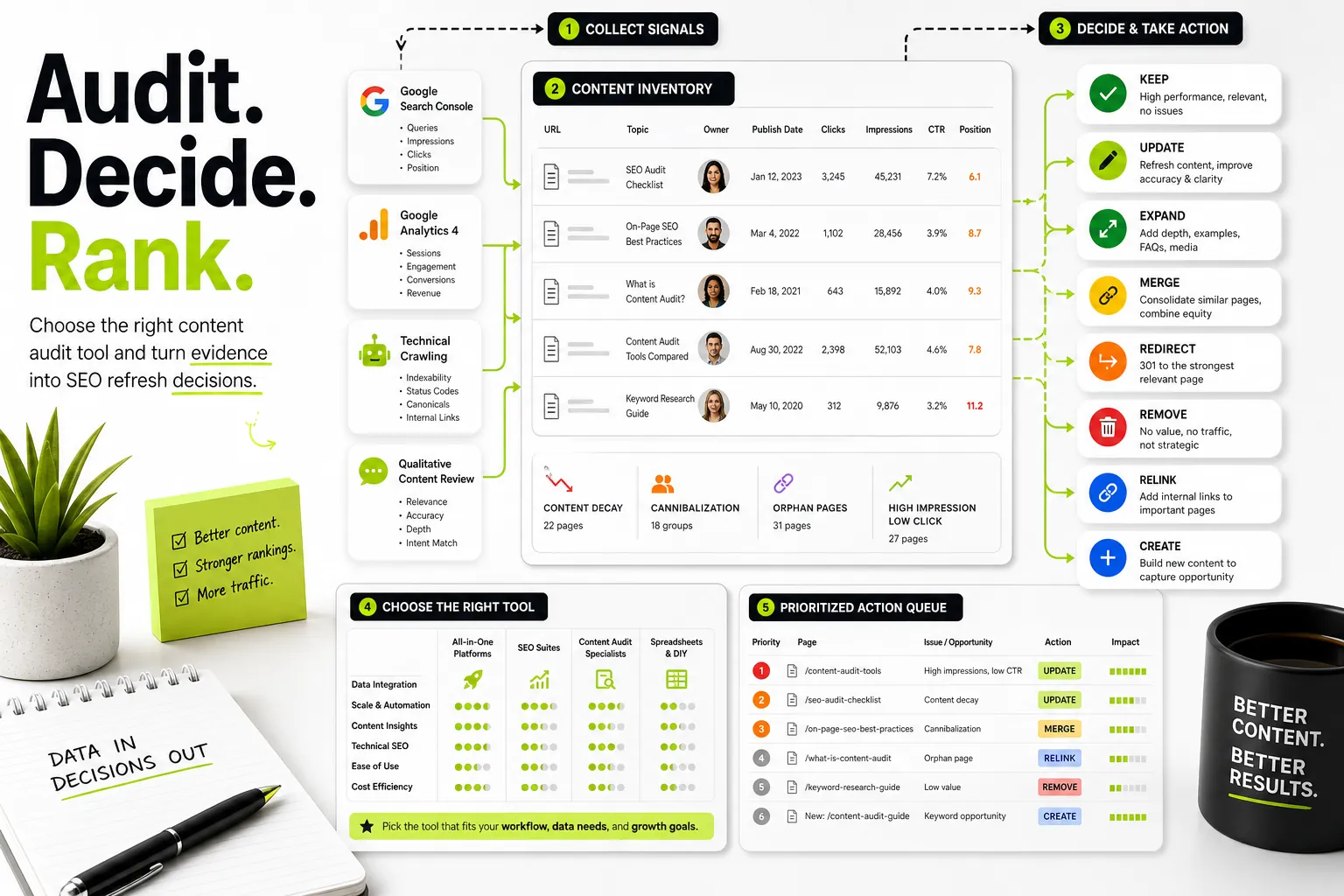
The Action Decision Matrix: Keep, Refresh, Merge, Redirect, Remove, or Create
Apply these standard metric rules to assign definitive lifecycle actions across your inventory:
| Action | Performance Profile | Qualitative & Intent Condition | Required Execution |
|---|---|---|---|
| Keep | High traffic, stable/growing impressions, strong conversions. | Fully accurate, matches intent, modern visual elements. | Maintain internal linking; no structural page edits required. |
| Refresh | Declining traffic, strong impression base in striking distance (Positions 8–20). | Outdated examples, minor content gaps, correct search intent. | Update facts, improve headings, refresh meta tags, and re-publish. |
| Merge | Divided impressions across 2+ pages, low conversion rates. | Overlapping topics, split keyword rankings across site. | Combine unique content into primary URL; 301 redirect secondary URL. |
| Redirect | Zero traffic, dead product/service offer, external backlink value exists. | Outdated product page, retired feature, redundant category. | Implement 301 redirect to the most relevant live parent URL. |
| Remove / Prune | Zero clicks/impressions over 12 months, zero backlinks, no conversion value. | Thin content, irrelevant topic, completely obsolete subject. | Delete URL; return HTTP 410 or 404 status code; remove from sitemap. |
| Create | High competitor coverage, zero existing domain rankings or URL footprints. | Validated audience demand, unaddressed user intent. | Draft a new page following targeted topic cluster briefs. |
Prioritization Formula and Worked Audit Example
Conducting a content audit on a site with hundreds or thousands of pages can quickly become overwhelming. Using a mathematically defined priority score allows your team to focus execution on high-impact assets first.
Calculating Content Audit Priority Scores
Calculate a Priority Score (1 to 100) using a weighted formula based on impression potential, striking-distance position, and business conversion value:
Where:
- Impression Volume Score (1–100): Scaled metric based on GSC total impressions relative to site averages.
- Striking Distance Score (1–100): Highest for pages with average positions between 8 and 20 (where small ranking gains drive large click increases); lower for pages already in positions 1–3 or past position 50.
- Business Value Score (1–100): Rated based on conversion performance (e.g., 100 = direct demo requests/purchases; 10 = generic top-of-funnel informational awareness).
Step-by-Step Sample URL Analysis and Action Scoring
Here is a practical worked example demonstrating how four distinct URLs are evaluated, scored, and assigned clear execution workflows:
      +--------------------------------------------------------------------------------------------------------------------------+
| URL Inventory Row Analysis                                                                                               |
+-------------------------------------+------------+--------+----------+---------------+----------------+------------------+
| URL String                          | 90-Day Imp | Clicks | Avg Pos  | Business Val  | Priority Score | Assigned Action  |
+-------------------------------------+------------+--------+----------+---------------+----------------+------------------+
| /blog/crm-integration-guide         | 45,000     | 410    | 12.4     | High (80)     | 86.4           | REFRESH          |
| /blog/legacy-software-tips-2018     | 120        | 2      | 68.2     | Low (10)      | 14.2           | PRUNE            |
| /solutions/enterprise-crm-features  | 18,000     | 220    | 14.1     | High (90)     | 78.8           | MERGE            |
| /blog/what-is-a-crm               | 88,000     | 3,400  | 2.1      | Medium (50)   | 45.0           | KEEP             |
+-------------------------------------+------------+--------+----------+---------------+----------------+------------------+
Detailed Breakdown of Sample Actions:
-
/blog/crm-integration-guide- Diagnosis: High impressions (45,000) but low CTR due to position 12.4 placement. Strong business alignment.
- Decision: REFRESH. Update sections with current API integration standards, improve title tag CTR, and add internal links from topically relevant blog posts.
-
/blog/legacy-software-tips-2018- Diagnosis: Outdated topic, minimal impressions, no backlinks, low business value.
- Decision: PRUNE. Remove the page, issue a 410 status code, and clean up any lingering internal links.
-
/solutions/enterprise-crm-features- Diagnosis: Shares core ranking queries with
/blog/crm-integration-guide, splitting organic search visibility. - Decision: MERGE. Move unique feature breakdowns into the primary guide, and 301 redirect this URL to
/blog/crm-integration-guide.
- Diagnosis: Shares core ranking queries with
-
/blog/what-is-a-crm- Diagnosis: Top 3 positioning, steady organic search click volume, high satisfaction of top-of-funnel informational search intent.
- Decision: KEEP. Monitor monthly performance; preserve existing link structure.
Optional Audit Layer: Evaluating AI Search Visibility and Citations
Beyond traditional search engine engine results pages (SERPs), AI discovery tools (such as ChatGPT, Perplexity, and Google Gemini) pull content directly from web indexes to summarize answers and generate source citations.
When to Include AI Visibility Auditing in Your Strategy
AI visibility auditing should be treated as an optional, secondary layer applied after core technical indexability, search performance, and intent alignment audits are complete.
      +-----------------------------------------------------------------------------------+
|                        SEO & CONTENT AUDIT LAYERS                                 |
+-----------------------------------------------------------------------------------+
|  CORE LAYER 1: Technical Indexability & HTTP Crawl Health (Mandatory)             |
|  CORE LAYER 2: Organic Search Performance (GSC / GA4 Clicks & Intent) (Mandatory) |
|  CORE LAYER 3: Keyword Cannibalization & Content Lifecycle (Mandatory)            |
+-----------------------------------------------------------------------------------+
                                          │
                                          ▼
+-----------------------------------------------------------------------------------+
|  OPTIONAL LAYER 4: AI Visibility & Direct Citation Auditing                        |
|  - Check brand query citations on Perplexity, ChatGPT, and Gemini                 |
|  - Verify semantic clarity and extractable structured data facts                   |
+-----------------------------------------------------------------------------------+
Key Considerations for AI Visibility Audits:
- When to include: Large enterprise brands, high-competition B2B SaaS verticals, or technical industries where users increasingly rely on conversational engines for vendor discovery.
- What to evaluate: Whether your content is clearly structured with direct answers, definitions, key specifications, and schema markup that AI models can read and cite.
- Operational boundary: Do not prioritize AI search visibility checks over fixing basic technical crawl errors, resolving site-wide keyword cannibalization, or updating severely decayed revenue-generating pages. AI engines rely on indexed, highly authoritative web content; fixing your core SEO foundation directly supports AI citation visibility.
When a GSC-First Workflow Fits: Operationalizing Audits with Dango
While enterprise crawlers generate massive technical spreadsheets, many growth teams struggle to convert those data exports into published page updates. When your goal is to quickly find search performance opportunities and act on them, a Search Console-first workflow provides an efficient bridge from audit data to content execution.
      +-----------------------------------------------------------------------------------+
|                       DANGO GSC-FIRST EXECUTION WORKFLOW                          |
+-----------------------------------------------------------------------------------+
|  1. Sync Google Search Console Data & XML Sitemap Context                          |
|  2. Identify Striking-Distance & High-Impression / Low-Click Opportunities        |
|  3. Run AI Query Clustering to Detect Overlap & Self-Cannibalization              |
|  4. Generate Structural Content Briefs & Contextual Internal Link Placements      |
+-----------------------------------------------------------------------------------+
Dango is a GSC-first SEO execution platform built to streamline the content refresh and publishing workflow. Instead of requiring manual spreadsheet manipulation, Dango connects directly to your Google Search Console account and crawls your active XML sitemaps—analyzing real live HTML structure, page headings, and existing text copy.
Connecting Search Console and Sitemap Data for Instant Audit Context
Connecting Dango to your site takes one click to authenticate Google Search Console access along with your active XML sitemap URL.
Once connected, Dango maps your actual search queries, impression trends, and click metrics directly against live on-page HTML assets. It automatically runs AI keyword clustering to identify overlapping URL structures, flagging keyword cannibalization issues across your published content before you write or update a page.
Turning High-Impression, Low-Click Pages into Briefs and Internal Links
Once high-impression, striking-distance assets are flagged, Dango translates those findings into direct editorial workflows:
- Automated Content Briefs & Drafts: Transforms GSC query gap data into structured briefs and updated article drafts designed to capture missed search volume.
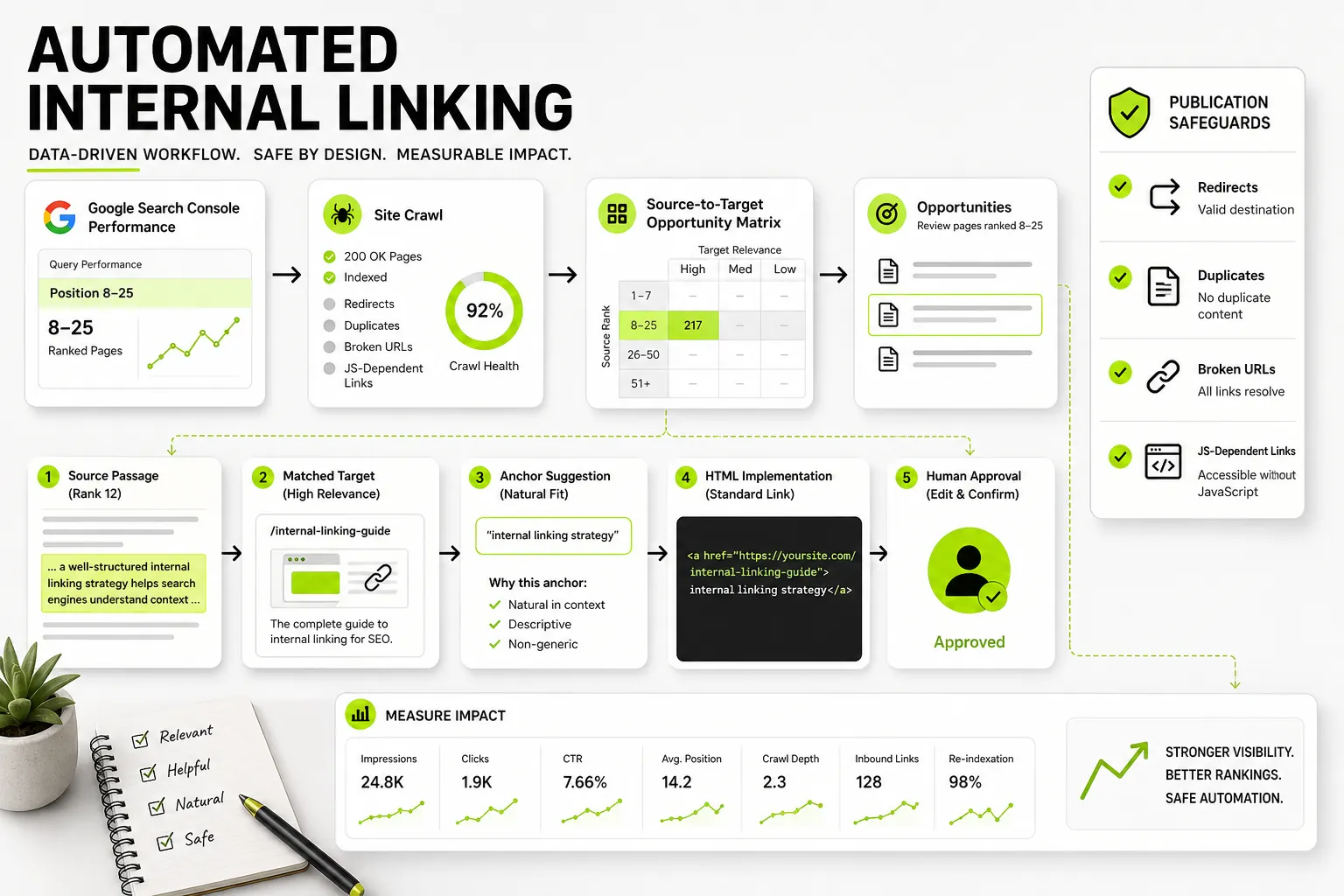
- Contextual Internal Linking: Analyzes published page inventory to recommend precise internal anchor text and link placement targets, strengthening link equity distribution to refreshed URLs.
- WordPress Connection: Allows teams to push updated content drafts directly into their publishing environment.
Dango is available under Limited Early Access with transparent monthly plans: the Starter Plan at $99/month and the Professional Plan at $299/month.
If your team wants to move past manual spreadsheet analysis and turn Google Search Console metrics directly into content updates and internal links, Get started with Dango today.
Post-Audit Execution Checklist and ROI Measurement Cadence
The content audit process ends only when updates are published and performance recovery is tracked. Follow this operational checklist to ensure smooth execution.
Establishing Your Content Refresh and Publishing Workflow
      +-----------------------------------------------------------------------------------+
|                        POST-AUDIT EXECUTION CHECKLIST                             |
+-----------------------------------------------------------------------------------+
| [ ] Step 1: Assign top priority URLs to content editors with target briefs.       |
| [ ] Step 2: Implement 301 redirects for merged/retired assets.                   |
| [ ] Step 3: Update canonical tags and internal links to point to active URLs.    |
| [ ] Step 4: Re-submit modified URLs via Google Search Console URL Inspection tool. |
| [ ] Step 5: Document change dates in analytics to track post-refresh baseline.    |
+-----------------------------------------------------------------------------------+
Measuring Organic Traffic Recovery and Post-Refresh Performance
Monitor updated assets using a 30-day, 60-day, and 90-day review cadence:
- 30-Day Window: Verify re-indexation of updated assets in GSC. Ensure 301 redirects are passing traffic properly without generating redirect loops or 404 errors.
- 60-Day Window: Check for impression growth on striking-distance queries. Look for initial ranking jumps in target keyword clusters.
- 90-Day Window: Evaluate overall organic click recovery, CTR adjustments, and goal conversion impact against the pre-audit performance baseline.
Frequently Asked Questions About Content Audit Tools
What is the difference between a technical SEO audit tool and a content audit tool?
A technical SEO audit tool focuses on server behavior, site architecture, and code health—checking HTTP status codes, canonical tags, page speed, and crawl budget distribution. A content audit tool focuses on page performance, search intent match, decay detection, and engagement. It evaluates clicks, impressions, conversion values, and keyword overlap to dictate lifecycle actions like refreshing, consolidating, or pruning content.
Can Google Search Console serve as a standalone content audit tool?
Google Search Console provides accurate baseline search performance data (clicks, impressions, CTR, average position), but it lacks key features required for a complete audit. GSC does not crawl full on-page HTML, track conversion metrics, map qualitative search intent alignment, or provide built-in team task management. Pairing GSC data with specialized software or a custom spreadsheet schema is recommended for full audit execution.
How often should marketing teams conduct a comprehensive website content audit?
Large publishing sites and enterprise B2B websites should perform a full content audit at least once or twice per year. However, content decay and striking-distance monitoring should run continuously. Using tools that provide automated performance tracking allows teams to refresh decaying assets quarterly rather than waiting for an annual site-wide review.
How do content audit tools detect keyword cannibalization and overlapping content?
Content audit tools detect keyword cannibalization by pulling search query performance logs from Search Console or third-party rank trackers and identifying instances where two or more URLs on the same domain compete for identical search queries. Advanced platforms use AI query clustering to group semantically similar queries and flag assets that split organic impressions across multiple URLs.
What metrics are most important when scoring content decay?
The most critical metrics for scoring content decay are percentage drops in organic impressions and clicks over a 6-to-12-month period, combined with average position changes on primary target queries. Comparing current performance metrics against historical benchmarks helps isolate natural seasonal variance from true content decay.
How do you convert content audit spreadsheet exports into actual publishing workflows?
To convert spreadsheet exports into publishing workflows, translate assigned audit actions (Refresh, Merge, Create) into explicit briefs with clear content recommendations. Assign each URL to a writer or editor with targeted keyword update instructions, deadline schedules, and explicit internal linking tasks, then track publication progress directly inside project management software or integrated SEO platform workflows.