Conducting a keyword gap analysis is one of the fastest ways to expand your site’s organic search visibility, discover high-intent customer queries, and claim market share from your search engine competitors. By systematically comparing your domain’s ranking footprint against competing websites, you can identify high-value search terms that your competitors rank for, but your domain currently misses or underperforms on.
However, many SEO teams fall into a common trap: they export thousands of competitor keywords from a third-party database, treat every unranked term as a brand-new page to write, and flood their editorial calendars with redundant content. This scattershot approach wastes budget and often leads to severe keyword cannibalization.
A truly strategic keyword gap analysis requires a Google Search Console (GSC)-first approach. By reconciling external competitor visibility data with your site’s real impression, click, and URL-level ownership data, you can separate true content gaps from existing pages that simply need a content refresh or better internal linking.
This guide provides a step-by-step workflow for running a keyword gap analysis, filtering out noise, scoring opportunities, avoiding cannibalization, and turning raw competitor insights into prioritized content actions.
What Is a Keyword Gap Analysis? (And Why It Matters)
A keyword gap analysis is the process of identifying search queries that your direct organic competitors rank for on the first page of search results, but for which your website either ranks poorly (e.g., positions 11–50) or does not rank at all.
When executed properly, a keyword gap analysis provides actionable insights into:
- Uncaptured Search Intent: Customer problems, feature queries, or comparison searches that your target audience uses, but your site fails to address.
- Competitor Content Strengths: Structural or semantic coverage areas where competitor domains hold a topical authority advantage.
- Low-Hanging Striking-Distance Wins: Keywords where your site already gains impressions in Google Search Console, but lacks the depth or page optimization required to reach top positions.
Keyword Gap vs. Content Gap vs. Owned-Site Optimization Gaps
To build an efficient SEO strategy, you must distinguish between three distinct opportunity types that are frequently lumped together:
| Gap Type | Definition | Data Source | Primary Action |
|---|---|---|---|
| Competitor Keyword Gap | Search terms where competitors hold top-10 organic rankings, but your domain does not rank in the top 100. | Third-Party SEO Tools (Semrush, Ahrefs) | Evaluate domain relevance, determine search intent, and decide whether to build a new page or expand an existing cluster. |
| Content Coverage Gap | Broader topics, subtopics, or buyer intent stages entirely absent from your site’s information architecture. | Competitive Analysis & Topic Mapping | Create new dedicated target pages or hub pages to establish topical coverage. |
| Owned-Site Optimization Gap | Queries where your site already earns GSC impressions or ranks on pages 2–3, but lacks top positions due to thin content, weak intent alignment, or poor internal linking. | Google Search Console Data | Refresh existing content, update target headings, optimize page metadata, and add contextual internal links. |
Understanding this distinction prevents you from creating duplicate content. If a competitor keyword gap corresponds to a term where your site already gets 2,000 monthly GSC impressions on position 18, you do not need a new page—you need an owned-site optimization refresh.
How Competitor Keyword Data Uncovers Untapped Traffic
Competitors invest heavily in testing content angles, page structures, and keyword targets. Analyzing their organic search footprint grants you access to real-world performance data across your industry.
Rather than guessing which subtopics interest your market, competitor keyword data highlights terms that already drive qualified organic traffic to competing domains. Reconciling this third-party visibility against your site’s Search Console footprint allows you to build a content roadmap grounded in proven demand and validated page ownership.
Step 1: Identify Genuine SEO Competitors
Before exporting keyword datasets, you must select the right competitor domains. Focusing on the wrong domains inflates your spreadsheets with thousands of irrelevant terms.
Business Competitors vs. Organic SERP Competitors
Your direct business competitors are not always your primary organic search competitors.
- Business Competitors: Companies offering identical products, software, or services to your target market.
- Organic SERP Competitors: Websites that consistently rank on page one for your target commercial and informational queries, regardless of their business model.
For example, a specialized B2B CRM vendor competes commercially against other CRM platforms. However, in organic search engine results pages (SERPs), that vendor also competes against publishers (HubSpot Blog, Forbes Advisor), review aggregators (G2, Capterra), and software review portals.
To perform a thorough keyword gap analysis, include a mix of direct commercial rivals and top-ranking industry publications that capture your target audience’s search traffic.
                          ┌─────────────────────────────────────────┐
                    │      Your Domain's Ideal Audience       │
                    └────────────────────┬────────────────────┘
                                         │
                   ┌─────────────────────┴─────────────────────┐
                   ▼                                           ▼
┌───────────────────────────────────────┐   ┌───────────────────────────────────────┐
│       Direct Business Competitors     │   │        Organic SERP Competitors       │
│  • Same product/service offerings     │   │  • Publishers & media sites           │
│  • Compete for direct conversions     │   │  • Review aggregators & forums        │
│  • May have smaller organic presence  │   │  • High topical authority on queries  │
└───────────────────────────────────────┘   └───────────────────────────────────────┘
Finding Competitor Domains with Semrush, Ahrefs, and Google Keyword Planner
To identify your true organic search competitors:
- Use Organic Competitor Reports: In third-party tools like Semrush (Organic Research > Competitors) or Ahrefs (Competitive Analysis / Competing Domains), enter your domain. These tools calculate SERP overlap based on shared top-50 organic keyword rankings.
- Analyze Seed Query SERPs: Enter 10 to 15 core commercial search terms into Google Keyword Planner or perform manual Google searches. Track which domains consistently appear in top positions and featured snippets.
- Select 3 to 5 Competitor Domains: Choose 2 direct business competitors and 1 to 2 strong SERP/content competitors. Including more than 5 competitors creates unwieldy datasets with marginal returns.
Step 2: Collect and Categorize Competitor Keyword Data
Once you have identified 3 to 5 target competitor domains, export their ranking keyword data using your preferred competitive intelligence software.
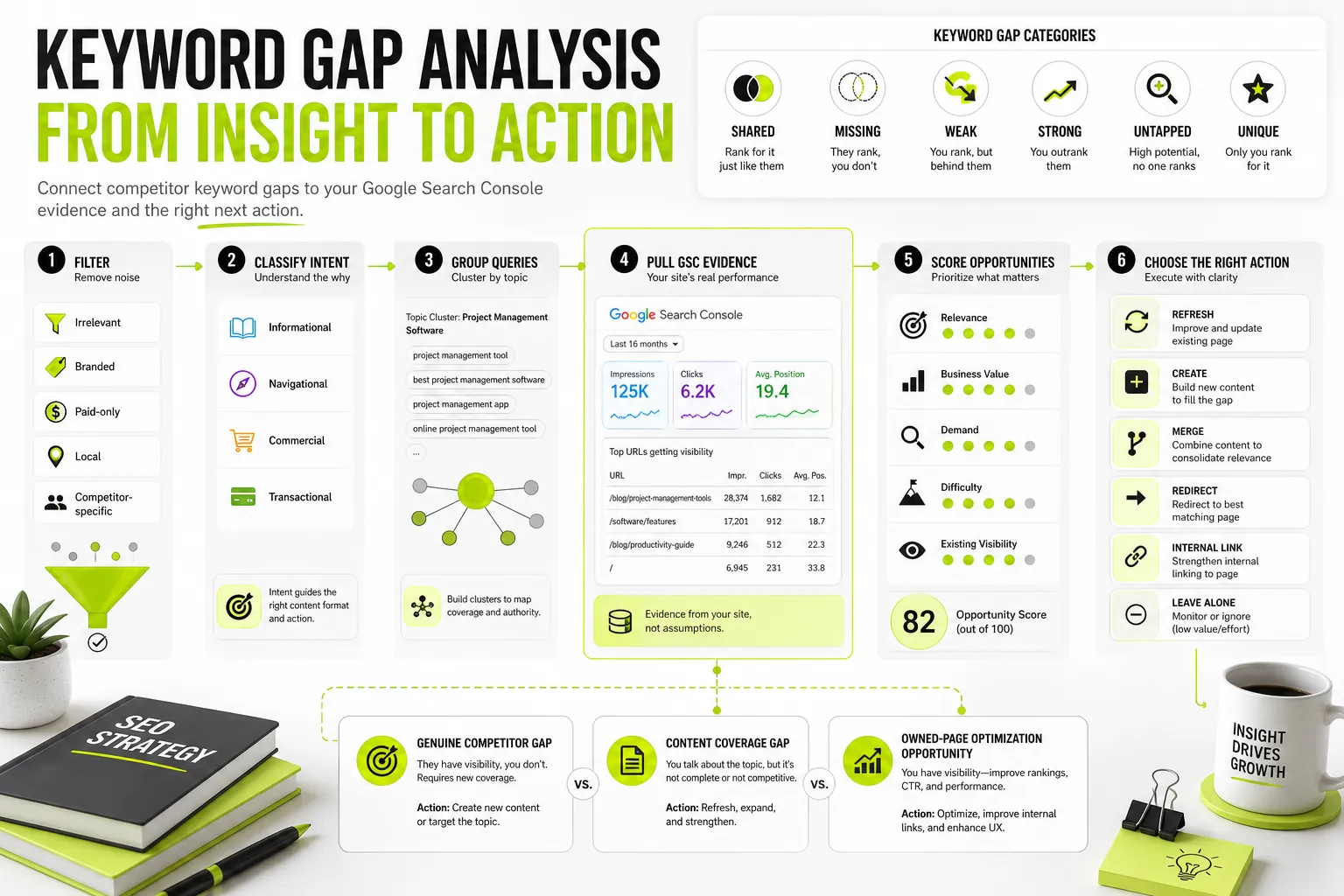
The 6 Core Keyword Categories: Shared, Missing, Weak, Strong, Untapped, and Unique
To process raw competitive keyword exports effectively, map every query into one of six core keyword gap categories:
                                  ┌──────────────────────────────────┐
                            │    Raw Competitor Keyword Data   │
                            └────────────────┬─────────────────┘
                                             │
             ┌───────────────────────────────┼───────────────────────────────┐
             ▼                               ▼                               ▼
  ┌─────────────────────┐         ┌─────────────────────┐         ┌─────────────────────┐
  │   1. Shared Terms   │         │   2. Missing Terms  │         │    3. Weak Terms    │
  │  Both rank top 10   │         │  You: > 100 / None  │         │  You: Pos 11–50     │
  │  Comp: Top 10       │         │  Comp: Top 10       │         │  Comp: Top 10       │
  └─────────────────────┘         └─────────────────────┘         └─────────────────────┘
             │                               │                               │
             ▼                               ▼                               ▼
  ┌─────────────────────┐         ┌─────────────────────┐         ┌─────────────────────┐
  │   4. Strong Terms   │         │  5. Untapped Terms  │         │   6. Unique Terms   │
  │  You: Top 3–5       │         │  1 Comp ranks top 10│         │  You rank top 10    │
  │  Comp: Pos 6–20     │         │  Others unranked    │         │  Comp: Unranked     │
  └─────────────────────┘         └─────────────────────┘         └─────────────────────┘
- Shared Keywords: Search terms where both your domain and competitors rank in the top 10 organic positions. These represent established topical authority for both sites.
- Missing Keywords: Queries where one or more competitors rank in the top 10, but your site does not rank in the top 100. These represent true potential content gaps.
- Weak Keywords: Queries where competitors rank in top positions (positions 1–5), while your domain lags behind on page 2 or 3 (positions 11–30). These are high-priority refresh candidates.
- Strong Keywords: Terms where your domain holds top-3 rankings while competitors lag behind. Monitor these to preserve your competitive moat.
- Untapped Keywords: Queries where only a single competitor domain ranks in the top 10 while all other analyzed domains are absent. These often signal emerging trends or niche subtopics.
- Unique Keywords: Search terms where your site ranks in top positions, but none of your selected competitors rank.
Differentiating Organic Rankings from Paid Search Overlap
When analyzing competitive datasets, ensure you separate organic search rankings from paid search (PPC) visibility.
Tools like Google Keyword Planner highlight commercial intent through Cost-Per-Click (CPC) and competition metrics, but paid ad positions do not indicate organic topical authority. If a competitor bids on a keyword via Google Ads but does not rank organically, they are paying for traffic because they lack organic visibility.
Focus your gap analysis strictly on organic SERP positions, organic traffic potential estimates, and organic landing page structures. Use high CPC values solely as an indicator of commercial value—not organic ranking difficulty.
Step 3: Clean, Filter, and Classify Search Intent
Raw keyword exports routinely yield thousands of search terms. Before scoring or mapping opportunities, you must clean the dataset and assign search intent.
Filtering Out Branded, Local, Seasonal, and Irrelevant Terms
Apply aggressive data filters to eliminate noise:
- Filter Competitor Brand Terms: Exclude queries containing competitor brand names, trademarked product names, or misspellings (e.g., “semrush pricing”, “ahrefs alternative”).
- Filter Off-Topic & Irrelevant Queries: Remove terms that fall outside your target audience’s core focus, product capability, or geographic reach.
- Exclude Hyper-Local Queries: Unless running a local SEO strategy, remove city-specific or regional qualifiers (“SEO agency Austin TX”).
- Account for Seasonal Anomalies: Identify terms driven by temporary traffic spikes (e.g., annual holiday campaigns or annual industry events) versus evergreen demand.
Evaluating Informational, Commercial, and Transactional Search Intent
Categorize every remaining term by search intent to ensure you build the correct page type:
      ┌──────────────────┬─────────────────────────────────────┬────────────────────────────────────┐
│ Search Intent    │ Query Pattern Examples              │ Ideal Page Type                    │
├──────────────────┼─────────────────────────────────────┼────────────────────────────────────┤
│ Informational    │ "how to do keyword gap analysis",   │ Educational Guide, Blog Post,      │
│                  │ "what is keyword difficulty"        │ Knowledge Base Article             │
├──────────────────┼─────────────────────────────────────┼────────────────────────────────────┤
│ Commercial       │ "best keyword research tools",      │ Comparison Page, Round-up List,    │
│                  │ "semrush vs ahrefs"                 │ Buyer's Guide                      │
├──────────────────┼─────────────────────────────────────┼────────────────────────────────────┤
│ Transactional    │ "buy SEO software",                 │ Product Landing Page, Pricing      │
│                  │ "keyword clustering tool pricing"   │ Page, Sign-Up Page                 │
├──────────────────┼─────────────────────────────────────┼────────────────────────────────────┤
│ Navigational     │ "dango login",                      │ Homepage, Brand Portal, Log-in     │
│                  │ "search console dashboard"          │ Gateway                            │
└──────────────────┴─────────────────────────────────────┴────────────────────────────────────┘
Matching search intent prevents misallocating resources—such as attempting to rank a product landing page for an informational “how-to” query.
Accounting for SERP Features, AI Overviews, and Zero-Click Queries
Traditional search volume metrics can be deceiving. A query with 5,000 monthly searches might yield minimal click-through traffic if the SERP is dominated by:
- AI Overviews (AIO): Direct AI-generated summary answers occupying top screen real estate.
- Featured Snippets & Knowledge Panels: Instant answers that resolve informational queries directly on the SERP.
- People Also Ask (PAA) Blocks: Accordion boxes that answer long-tail questions without requiring a site visit.
- Local Packs & Sponsored Ads: Heavy visual blocks pushing organic results below the fold.
If a search term suffers from severe zero-click behavior, downgrade its organic traffic potential during prioritization.
Step 4: Validate Competitor Opportunities Against Google Search Console
This step is where most standard keyword gap workflows fail. Third-party competitive databases rely on scraped SERPs, estimated traffic models, and sample panels. They do not know what is happening inside your real Google Search Console account.
Why Third-Party Keyword Databases Miss Your Actual Impression Data
Third-party databases frequently classify a keyword as a “Missing Gap” (0 rankings) simply because your page ranks at position 28 or 42, which fell outside their latest crawling threshold.
If you rely solely on third-party exports, you risk building a brand-new page for a query where your site already has an indexed URL pulling 1,500 monthly Search Console impressions. Creating a second page for that term introduces severe keyword cannibalization, splitting your page authority across two competing URLs.
Cross-Referencing GSC Queries, Impressions, CTR, and Existing URL Ownership
Before marking any competitor keyword as a “Create New Page” action, cross-reference the term against your domain’s performance data in Google Search Console:
- Export 12 Months of GSC Performance Data: Pull all queries alongside their total Impressions, Clicks, Average Position, and Landing Pages.
- Map Competitor Keywords to GSC Queries: Run a VLOOKUP, XLOOKUP, or database join matching competitor gap queries against your GSC query list.
- Classify Real Visibility:
- True Gap: 0 GSC Impressions, no existing indexed URL holds intent relevance.
- Striking-Distance Opportunity: High GSC Impressions, Average Position between 11 and 30, with a clear existing landing page.
- Underperforming Page: High Impressions, top-10 Position, but abnormally low Click-Through Rate (CTR) compared to SERP benchmarks.
When auditing site performance, combining competitor benchmark gaps with your owned Search Console metrics ensures complete coverage across both external opportunities and existing asset refreshes. For a comprehensive walkthrough on auditing your site’s health and performance metrics directly, explore our detailed Google Search Console SEO audit guide.
Step 5: Score and Prioritize Opportunity Gaps
After cross-referencing competitor data with GSC impressions, you will likely have dozens or hundreds of validated keyword gaps. To maximize ROI, score each opportunity using a systematic prioritization framework.
The Opportunity Scoring Formula: Balancing Search Volume, Difficulty, Intent, and Business Value
Use a composite scoring model to rank opportunities objectively:
Where:
- Search Volume: Monthly estimated search volume.
- Business Value (1–5 Scale):
- 5: Direct tie to product features or revenue generation.
- 3: Relevant topic that attracts target persona.
- 1: Broad, top-of-funnel term with minimal business context.
- Intent Multiplier: Transactional (1.5), Commercial (1.3), Informational (1.0).
- Keyword Difficulty (KD): 1 to 100 metric provided by competitive tools.
- GSC Factor:
- 1.5: Striking-distance term (already gets GSC impressions on positions 11–30; fast win).
- 1.0: True missing gap (requires brand-new content).
- 0.5: Zero GSC impressions, high KD, low business value (low priority).
How to Use the Copyable Keyword Gap Analysis Spreadsheet Template
Structure your keyword gap working sheet with these clear operational columns:
| Column Header | Data Type / Option | Description |
|---|---|---|
| Target Keyword | Text | Cleaned, non-branded search query. |
| Search Intent | Info / Comm / Trans | Primary intent classification. |
| Search Volume | Integer | Monthly search demand estimate. |
| Keyword Difficulty | 1–100 Scale | Competition score from research tools. |
| Competitor Best Rank | Position Number | Highest organic position among competitors. |
| GSC Impressions | Integer | Owned 90-day impressions from Google Search Console. |
| GSC Average Position | Float / Blank | Current owned position (blank if no impressions). |
| Current Target URL | URL / “None” | Existing URL receiving impressions or “None”. |
| Business Value | 1–5 Scale | Internal commercial value score. |
| Priority Score | Calculated Integer | Calculated score using the prioritization formula. |
| Recommended Action | Create / Refresh / Merge / Ignore | Final assigned content execution task. |
To extend this workflow into page-level metadata and keyword-to-URL structural mapping, download our copyable keyword mapping template , which offers pre-built operational fields for managing target primary terms, intent categories, and content update workflows.
Step 6: Map Findings to Content Actions and Prevent Cannibalization
With prioritized scores assigned, translate every keyword row into an actionable content task.
                                     ┌──────────────────────────────────┐
                               │     Scored Keyword Opportunity    │
                               └────────────────┬─────────────────┘
                                                │
                                  Does an existing URL hold
                                   GSC impressions/intent?
                                                │
                       ┌────────────────────────┴────────────────────────┐
                       │                                                 │
                    [ YES ]                                            [ NO ]
                       │                                                 │
          Are multiple existing URLs                             Is search volume and
          competing for this term?                                business value high?
                       │                                                 │
             ┌─────────┴─────────┐                             ┌─────────┴─────────┐
             │                   │                             │                   │
          [ YES ]              [ NO ]                       [ YES ]              [ NO ]
             │                   │                             │                   │
             ▼                   ▼                             ▼                   ▼
     ┌───────────────┐   ┌───────────────┐             ┌───────────────┐   ┌───────────────┐
     │ MERGE / REDIR │   │ REFRESH PAGE  │             │  CREATE NEW   │   │ IGNORE / LEAVE│
     │ Consolidate   │   │ Update content│             │  Build new    │   │  Low value or │
     │ thin pages    │   │ & internal    │             │  targeted page│   │  irrelevant   │
     │ into master   │   │ links         │             │  asset        │   │  opportunity  │
     └───────────────┘   └───────────────┘             └───────────────┘   └───────────────┘
Defining Content Actions: Create New Page, Refresh, Merge, or Redirect
Assign one of five distinct operational statuses to each row:
- Create New Page: Assigned ONLY when GSC shows zero impressions across your domain, no existing URL targets the intent, and search volume/business value justifies a new asset.
- Refresh Existing Page: Assigned when your domain holds an existing URL with GSC impressions on positions 11–30. Expand content coverage, update target headings, improve intent match, and add internal links.
- Merge Pages: Assigned when two or more thin, outdated pages on your site split impressions for the target query. Combine their best sections into a comprehensive resource.
- Redirect (301): Assigned to legacy URLs that are consolidated during a page merge. Point old paths to the newly unified primary URL.
- Leave Alone / Ignore: Assigned to keywords with high difficulty, zero business relevance, or zero-click SERP domination.
Clustering Keywords Semantically Before Assigning Core Target URLs
Never assign individual keywords to individual pages in a 1:1 ratio. Modern search engines evaluate pages based on topic coverage, semantic relationships, and entity coverage.
Before writing briefs:
- Group long-tail variations, synonyms, and sub-questions into unified keyword clusters.
- Check SERP overlap: If top-ranking Google results show identical URLs ranking for Query A and Query B, both queries belong on the exact same page.
- Grouping your terms into logical semantic keyword groups ensures that secondary terms and long-tail variants reinforce a single primary URL rather than creating competing pages.
- If you want to automate this process, using free keyword clustering tools or dedicated SERP-based grouping scripts can save hours of manual grouping while ensuring your target terms map cleanly to intent-aligned pages.
Worked Example: Analyzing a Competitor Keyword Gap Dataset
To see this workflow in action, let’s walk through a realistic scenario for a modern B2B SaaS platform specializing in content management tools.
From Raw Competitor Export to Final Page Brief
Scenario: You manage SEO for a SaaS platform. You run a competitor gap export against two primary organic SERP rivals (CompetitorA.com and CompetitorB.com).
1. The Raw Competitor Export Data
The initial third-party export identifies 4 potential keyword gap opportunities:
      ┌───────────────────────────────────────┬────────┬────┬─────────────────┬─────────────────┐
│ Target Query                          │ Volume │ KD │ Comp A Position │ Comp B Position │
├───────────────────────────────────────┼────────┼────┼─────────────────┼─────────────────┤
│ "content audit workflow"              │ 1,800  │ 42 │ Pos 2           │ Pos 4           │
│ "best content audit template excel"   │ 720    │ 28 │ Pos 1           │ Pos 3           │
│ "competitor brand software review"    │ 3,200  │ 65 │ Pos 3           │ Pos 12          │
│ "how to audit website content steps"  │ 2,400  │ 35 │ Pos 5           │ Pos 2           │
└───────────────────────────────────────┴────────┴────┴─────────────────┴─────────────────┘
2. Cross-Referencing Google Search Console Data
Next, you join this dataset with 12 months of internal Google Search Console performance metrics:
      ┌───────────────────────────────────────┬─────────────────┬──────────────┬──────────────────────────────────────────┐
│ Target Query                          │ GSC Impressions │ GSC Avg Pos  │ Existing Owned Landing Page              │
├───────────────────────────────────────┼─────────────────┼──────────────┼──────────────────────────────────────────┤
│ "content audit workflow"              │ 2,450           │ 18.2         │ https://yoursite.com/blog/content-audit  │
│ "best content audit template excel"   │ 410             │ 22.4         │ https://yoursite.com/blog/content-audit  │
│ "competitor brand software review"    │ 0               │ —            │ None                                     │
│ "how to audit website content steps"  │ 0               │ —            │ None                                     │
└───────────────────────────────────────┴─────────────────┴──────────────┴──────────────────────────────────────────┘
3. Intent Classification, Scoring, and Action Mapping
Applying intent logic, GSC validation, and prioritization scoring reveals the true content decisions:
      ┌───────────────────────────────────────┬──────────────┬───────────────────┬──────────────────────────────────────────┐
│ Target Query                          │ Intent       │ Priority Score    │ Final Content Action Assigned            │
├───────────────────────────────────────┼──────────────┼───────────────────┼──────────────────────────────────────────┤
│ "content audit workflow"              │ Informational│ 84.5 (High)       │ REFRESH existing /blog/content-audit page│
│ "best content audit template excel"   │ Commercial   │ 76.2 (High)       │ CLUSTER into /blog/content-audit (Add UX)│
│ "competitor brand software review"    │ Navigational │ 12.0 (Low)        │ IGNORE (Competitor trademark name)       │
│ "how to audit website content steps"  │ Informational│ 91.0 (High)       │ CLUSTER into /blog/content-audit REFRESH │
└───────────────────────────────────────┴──────────────┴───────────────────┴──────────────────────────────────────────┘
Key Takeaways from the Decision Analysis:
- Third-party tools listed
"content audit workflow"as a gap, but Search Console proved an existing page already earned 2,450 impressions at position 18.2. Instead of building a new page, the action is a page refresh. -
"best content audit template excel"and"how to audit website content steps"share identical SERP intent with the primary content audit topic. They were grouped into a single semantic cluster targeting the existing/blog/content-auditURL. -
"competitor brand software review"was discarded as an irrelevant competitor brand term.
4. Turning the Cluster into an Executable Brief
Instead of writing three separate articles, you produce one comprehensive brief to update https://yoursite.com/blog/content-audit:
- Primary Target Query: “how to audit website content”
- Secondary Cluster Keywords: “content audit workflow”, “best content audit template excel”, “content audit steps”
- Structural Upgrades Required: Add an embedded copyable spreadsheet template, insert an step-by-step audit workflow graphic, update H2 subheadings to reflect missing long-tail queries, and add 3 contextual internal links from related hubs.
Tracking Post-Implementation Rankings and Organic Growth
After deploying content updates or publishing newly created pages, track performance across 30-, 60-, and 90-day intervals:
      ┌──────────────┬──────────────────────────────────────────────────────────────────────────────────────────────┐
│ Timeframe    │ Focus Metrics & Actions                                                                      │
├──────────────┼──────────────────────────────────────────────────────────────────────────────────────────────┤
│ Days 1–14    │ • Submit updated or new URLs in Google Search Console for indexing.                          │
│              │ • Verify internal link placements across existing site architecture.                          │
├──────────────┼──────────────────────────────────────────────────────────────────────────────────────────────┤
│ Days 15–30   │ • Monitor GSC Impressions: Early growth indicates Google recognizes expanded topical scope.  │
│              │ • Track indexation status and crawling frequency in GSC URL Inspection tool.                  │
├──────────────┼──────────────────────────────────────────────────────────────────────────────────────────────┤
│ Days 31–60   │ • Track Clicks & Average Position: Striking-distance keywords should move toward page 1.     │
│              │ • Evaluate SERP CTR: If positions reach top 5 but CTR is low, optimize Title tags & Meta.    │
├──────────────┼──────────────────────────────────────────────────────────────────────────────────────────────┤
│ Days 61–90+  │ • Assess Organic Conversions & Business Revenue generated from validated target clusters.     │
│              │ • Identify newly emerging secondary long-tail impressions for future minor refreshes.         │
└──────────────┴──────────────────────────────────────────────────────────────────────────────────────────────┘
Turn Your Keyword Gap Findings into Actionable SEO Workflows with Dango
Collecting competitor keyword exports from external tools like Semrush or Ahrefs gives you raw market data. However, turning those exports into prioritized content decisions requires site-aware intelligence that understands your domain’s real Google Search Console performance and sitemap structure.
Connecting Search Console Intelligence to Smart Keyword Clusters and Briefs
While Dango is not a third-party competitor domain database, it connects directly to your Google Search Console account and XML sitemaps to automate the site-aware execution phase of your keyword gap analysis.
Once you identify competitive queries using external tools, Dango helps you bridge the gap between third-party research and owned execution:
- GSC Impression Validation: Automatically surface queries where your domain already receives impressions, ensuring you never create duplicate pages for striking-distance opportunities.
- Semantic Keyword Clustering: Group raw competitor query lists into intent-aligned clusters based on real search engine overlap, keeping your site structure clean.
- Automated Content Briefs: Transform validated keyword clusters into production-ready briefs complete with heading structures, search intent guidelines, and secondary targets.
- AI Article Generation: Generate comprehensive, structured first drafts grounded in your target clusters and brand voice.
Streamlining Content Planning and Internal Linking
Filling content gaps requires more than just publishing text; it demands smart internal linking to pass page authority to new or updated URLs.
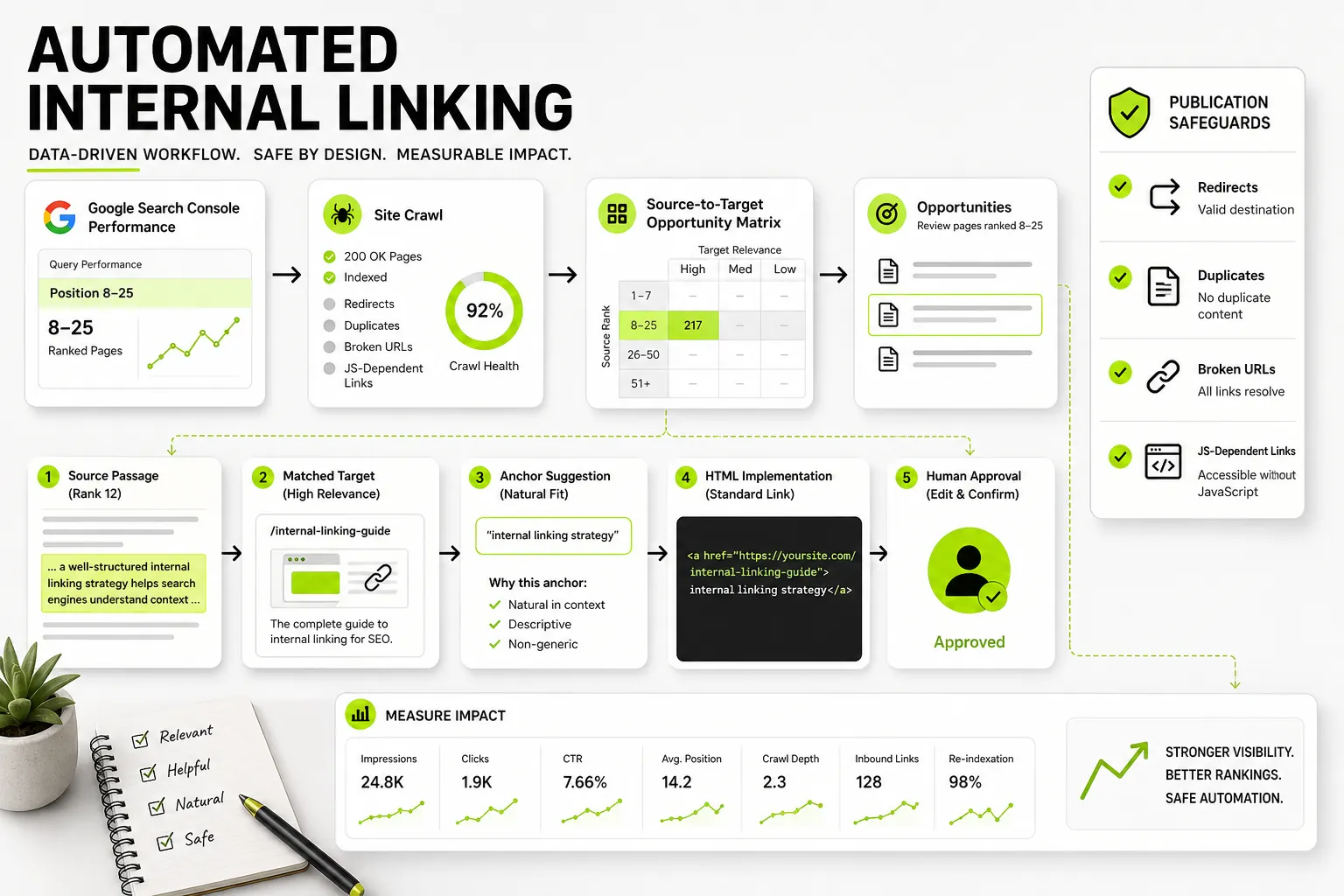
Dango analyzes your site architecture to recommend contextual internal links from high-authority pages directly to your newly created or refreshed gap target pages—eliminating manual link audits and accelerating ranking velocity.
Ready to transform raw keyword data into clear Search Console workflows, content briefs, and internal links? See how it works and streamline your SEO strategy today.
Frequently Asked Questions
How often should you perform a keyword gap analysis?
You should perform a full competitive keyword gap analysis once every quarter (3 to 4 months). This frequency allows sufficient time to publish new pages, deploy content refreshes, and collect 60 to 90 days of Google Search Console performance data. However, if operating in fast-moving industries (such as SaaS, fintech, or news), running light monthly check-ins on core commercial terms helps catch sudden competitor strategy shifts.
Can you do a keyword gap analysis for free using Google Search Console?
Google Search Console does not reveal competitor keyword rankings or third-party domain visibility. However, you can conduct a hybrid free gap analysis by exporting your own GSC performance data to identify striking-distance queries (positions 11–30), then manually inspecting top-ranking competitor pages for those queries in Google search results. For automated competitor keyword exports, a third-party competitive intelligence tool is required.
How many competitors should you include in a keyword gap analysis?
You should include 3 to 5 competitor domains. Including fewer than 3 competitors may leave structural topical gaps undetected, while including more than 5 results in unwieldy spreadsheets filled with low-relevance queries. A balanced mix consists of 2 direct business rivals and 1 to 2 high-performing SERP content competitors.
What is the difference between keyword search volume and traffic potential?
Keyword search volume measures the total number of times a specific query is searched monthly across an entire country or region. Traffic potential estimates the actual organic clicks your page can receive if it ranks in top positions, accounting for long-tail query variations, SERP layout compression, sponsored ads, and zero-click features like AI Overviews.
How do AI Overviews and zero-click search features affect keyword gap analysis?
AI Overviews, featured snippets, and knowledge panels answer informational user queries directly on the search results page, reducing organic click-through rates. When prioritizing keyword gaps, lower the target priority of broad definition queries that yield high zero-click behavior, and prioritize nuanced, commercial, or complex long-tail topics where searchers must click through to consume full details.
How do you prevent keyword cannibalization when filling content gaps?
To prevent keyword cannibalization, always cross-reference competitor gap lists against your internal Google Search Console performance data before creating new content. If an existing URL on your domain already earns impressions for the target search query, assign a content refresh or page consolidation action to the existing URL rather than publishing a competing page.